Taking over an app from another developer: what we check first
Switching app developers, or your agency went quiet? How to get the code and accounts into your name, and what a takeover audit checks first.
· 8 min read
When you are switching app developers, the previous team has usually moved on, the agency has gone quiet, or the product keeps breaking and nobody can say why. Whether it is a mobile app or a web platform, the first job is to understand what you are taking over, and to make sure it is in your name. That is why every takeover we do starts with a written audit, and why you read it before we start fixing anything.
In short
- Get control first. Before any code changes, the repository, hosting, domains, store accounts and keys should sit in accounts your company owns, with admin access in your name.
- Your app can move without losing its users. Apple and Google both let an app move to your own developer account, and existing users keep receiving updates. The move starts from the account that holds the app today.
- If your agency has stopped responding, start with what you can already reach, then ask once, in writing, for admin access to everything else.
- Then audit before you fix. A written audit shows who controls what, whether the product can be built and released, what breaks, where people give up and what makes every change risky. It sets the order of the first fixes.
Who controls the code and the accounts
Before anything else, we map where everything lives, who can reach it and whose name it is in:
- the code repository, and who has admin access to it
- hosting, servers, databases and backups
- domains, DNS and email settings
- the App Store and Google Play accounts and their store listings
- the signing keys and certificates that let you release an update
- analytics, crash reporting and payment accounts
- the API keys and passwords the product needs to run
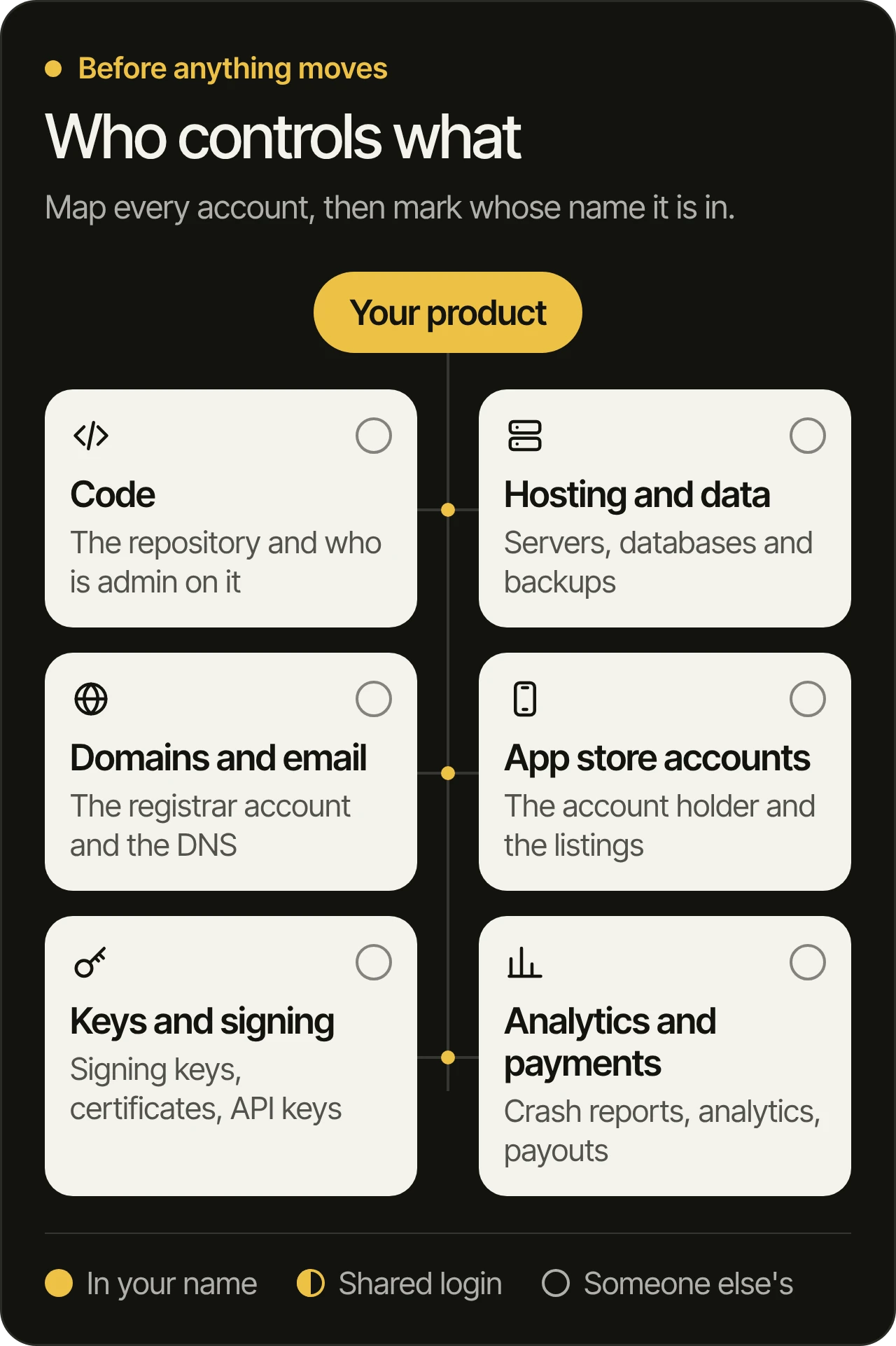
A login is not ownership. A shared password or a guest seat can be removed by whoever holds the account. For each item, the audit notes whether your company holds the owner or admin role, or only a seat that someone else controls.
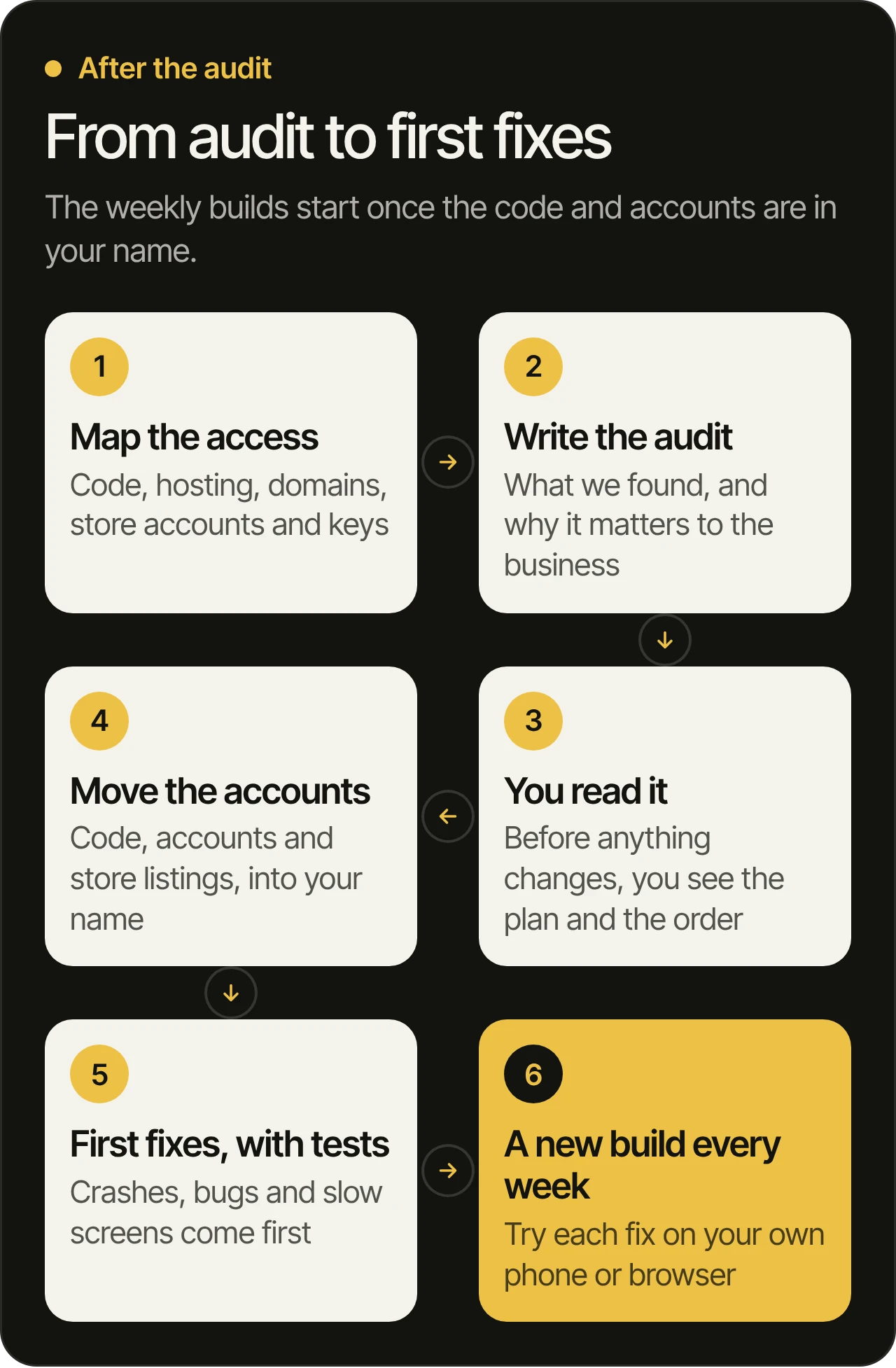
Then we plan the move with you, so that code, accounts and store listings are set up in your name. Some of it you can move yourself. Some of it needs the previous team’s help. The audit says which is which, so nothing surprises you later.
Moving the store listings and keys into your name
An app on the App Store or Google Play belongs to the developer account that published it. If that account is the agency’s, so is the listing, until it moves.
- App Store. Apple’s app transfer (opens in a new tab) moves an app from one developer account to another. The Account Holder of the current account starts it, and the Account Holder of yours accepts it. The app keeps its reviews and ratings, and users keep receiving updates. A few services, such as TestFlight testing and Apple Pay, have to be set up again on your side.
- Google Play. Google’s transfer between developer accounts (opens in a new tab) moves the app with its users, ratings, reviews and subscriptions. The old account’s reports stay behind, so download them first.
- Signing keys. Every Android update has to be signed. With Play App Signing (opens in a new tab), Google keeps the app signing key and can reset a lost upload key. If the old team managed the signing key themselves, find out early where it is, because a lost key of that kind cannot be reset. On iOS, the account holder can create new certificates, so the account matters more than the files.
A web platform works the same way. The domain registrar account, the DNS, the hosting or cloud project and the email settings each belong to an account, and a domain registered in someone else’s account can take your website and your email with it.
If your agency has stopped responding
Many takeovers start here: the agency stops answering, and the product is still live. Nothing has to be decided in a panic. Work through it in this order:
- List what you can already reach: every account you can log in to, the contract, the invoices and any handover notes.
- Check whose name each thing is in: the domain’s registrant, the account holder of each store account, the owner of the code repository, and the payment and analytics accounts.
- Ask once, in writing, for exactly what you need. Name each account and the access you need (owner or admin, not a guest seat), so the request is easy to act on and easy to show later.
- Read the contract’s ownership clause. It decides who owns the code. If the code or an account is yours under the contract and nobody answers, a lawyer can help you ask formally.
- Know the fallback. If an app can never be transferred, it can be published again from your own account as a new listing. That listing starts without the old reviews, and current users have to install it again, which is why the transfer is worth pursuing first.
What the audit checks next
Once we know who controls what, the audit looks at the product itself. It has five parts, and the first is the access map above.
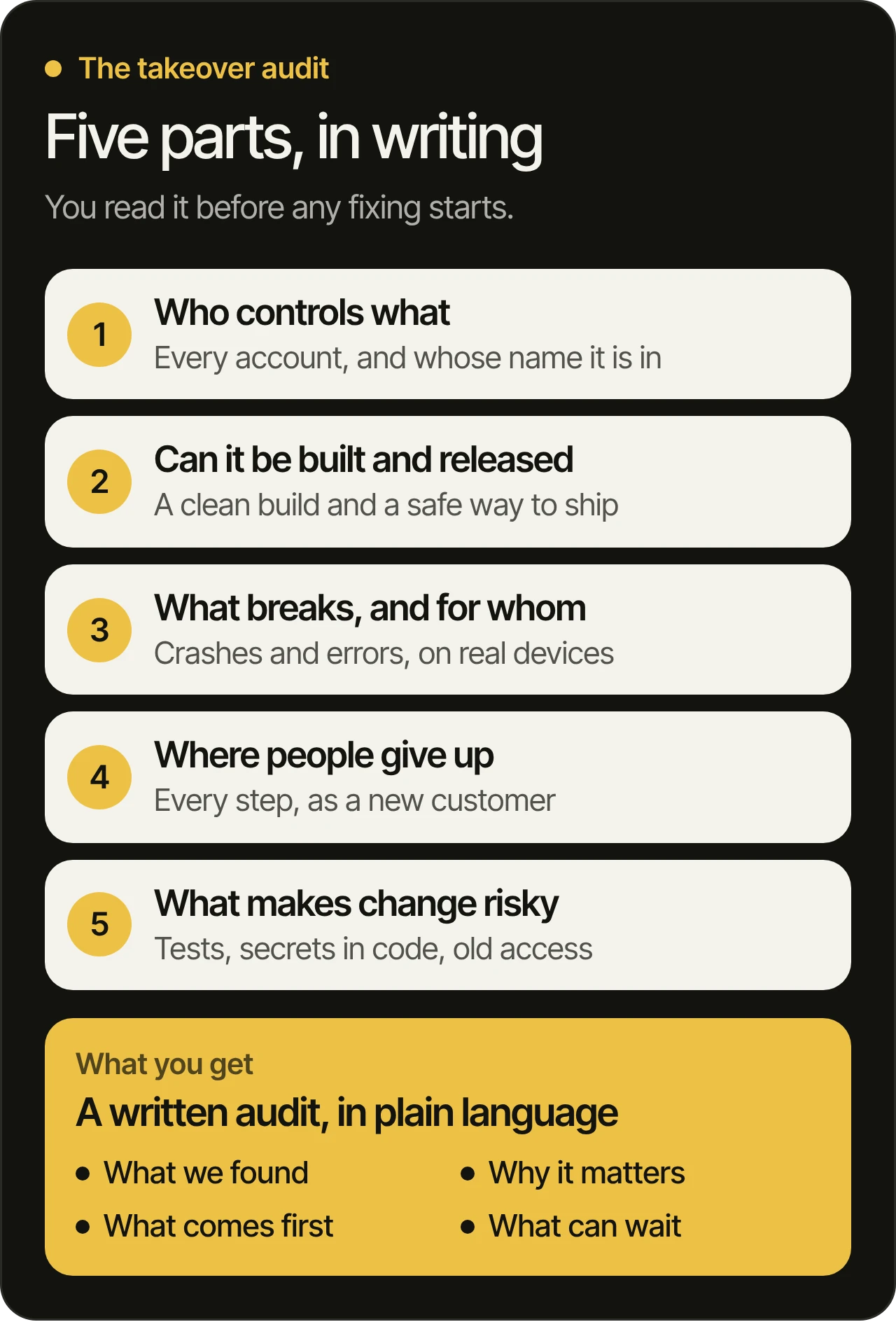
Whether the product can be built and released
A product nobody can rebuild is a product nobody can fix. So we check:
- whether the project builds from a clean machine, with the steps written down
- which dependencies are out of date, and which of them have known security issues
- how a release reaches users today, and when the last one went out
- whether there is a staging version you can try before your customers see a change
This is often where the real risk hides. A product can look fine from the outside while nobody is able to ship a change to it safely.
What breaks, and for whom
Next we look at what your users run into. Crash reports, error logs, store reviews and support emails all say something, and together they show which problems are rare and which ones hit people every day. We reproduce the worst ones ourselves, on real devices and browsers, so the fix list starts from what actually happens to people.
Where people give up
Then we walk through the product the way a new customer would: the first screen, the signup, the main thing the product is for, and the payment, if it takes payments. We note every step where it is unclear what to do next, where a form asks for too much, or where a screen is slow enough to lose someone.
We also read the store listing and the first screens the way a stranger would, because that is where a new customer decides whether to stay. If the product already measures these steps, we read the numbers. If it does not, adding that measurement goes on the list, because every later decision depends on it.
What makes every change risky
Some problems never show on a screen. We check:
- whether there are automated tests, and whether they still pass
- how the code is organized, and which parts are hard to change without breaking others
- whether secrets such as passwords or keys sit in the code itself
- who still has access, including people who have left the project
- whether changes are reviewed before they ship
None of this is about blame. Every product that has changed hands carries some of it, and knowing where it sits is what lets us change things without breaking them. Once the accounts are in your name, we help you remove access nobody needs any more and change the keys and passwords the old team knew.
What the audit gives you
The audit is written in plain language, for the people who run the business as much as for developers. It covers:
- what we found, grouped by how much it affects your users and your business
- why each issue matters to the business
- what we would fix first, and in what order
- what can wait, and why
Then the work starts in that order. Crashes, bugs and slow screens are fixed first, with tests so they stay fixed. Once the code and accounts are in your name, you get a new build to try every week, so you see each fix on your own phone or browser as it lands.
Questions owners ask
Who owns the source code of my app?
Usually the contract decides. Paying for an app does not always mean you own its code, so read the ownership or IP clause, and ask a lawyer if it is unclear. Whatever the contract says, keep the code in a repository that your company’s account owns, so you can always reach it.
Can my app move to my own App Store and Google Play accounts?
Yes. Both stores have an official transfer that the account holding the app starts and your account accepts. The app keeps its listing, reviews and ratings, and users keep receiving updates. A few services have to be set up again on your side, and the audit lists them.
What if my app developer stops responding?
Start with what you can already reach: your logins, the contract and the invoices. Check whose name the domain, the store accounts and the repository are in, then ask once, in writing, for owner or admin access to everything else. If the contract says the code is yours and nobody answers, a lawyer can help you ask formally.
Do we need to rebuild the app from scratch?
Usually not, and never before the audit. A rebuild throws away what already works and what your users already know. The audit shows which parts are worth keeping and which, if any, would take more work to fix than to replace.
Will our users notice the move?
They should not. We plan each step so the product keeps running while the code, hosting and accounts move, and both stores keep sending updates to existing users after a transfer. The first thing users should notice is the fixes.
What should we prepare before the first call?
Nothing formal. A link to the product, the accounts you know about and the problems that worry you most are enough. We go through your product before the call, so the time goes on what to check and fix first.
Thinking about a takeover?
If your product is live but stuck, or your agency has stopped responding, book a free 45-minute consultation. We go through your product before the call, then show you what we would check and fix first, and how. You can also see what a product takeover includes, and how it fits the ways we work.