Hiring app developers in Dubai: who builds it and who owns it
Hiring app developers in Dubai? Check who writes and reviews your code, and whose name the code, store accounts and signing keys are in, before you sign.
· 9 min read
You are hiring app developers in Dubai, and the shortlist looks alike: the same services, the same portfolio screens, the same promises. Two questions tell the teams apart, and most comparison pages never ask them. Who writes and reviews your code, and where do they work? And whose name are the code, the developer accounts, the store listings and the signing keys in, from the first day? This article gives you the questions, what a good answer sounds like and how to check each one before you sign. MobiStack Digital is one of the teams you may be comparing, so where we answer a question ourselves, we say how.
In short
- Ask who writes your code, who reads it and where they work. The people in the sales meeting are not always the people who build. A team that cannot say how every change is reviewed has no review.
- Your company should own the code, the store accounts, the listings and the signing keys from the first day. Both app stores ask a registered organization to enroll, and on the iPhone store the organization’s name is shown as the seller of the app.
- Moving an app to your name later is possible, but not complete. Both stores support transfers, and some things stay behind, such as test groups on Android.
- Check before you sign, not after. Open the store listing of a product the team built, ask where the keys are kept, ask to create the accounts in your company’s name together, and have a lawyer in the UAE read the ownership clause.
Who writes and reviews the code, and where do they work?
Ask for the roles of the people who will write your code, where they work and who reads each change before it ships. A Dubai office does not tell you who builds your app. Some teams build in-house and some pass the work on. Either can be fine, as long as you know which one you are hiring.
Put these four questions to every team on your shortlist:
- Do the people in the sales meeting build the app, or does another team?
- Is any of the work passed to another company or to freelancers, and will you be told?
- Which hours overlap with your working day, and who answers when something breaks?
- What runs automatically on every change, and who reads it before it ships?
The last question matters most. A team can build quickly and still ship changes nobody read. Our office is in Dubai, and our developers work remotely from Beirut. Our developers build with AI and review every line. Every change passes automated tests and automated code review, and one of our developers reads it before it ships. A change nobody read does not ship. The full path is written out in Is code written with AI safe?, and you can read more about us.
Whose name should the code, the store accounts and the listings be in?
Your company’s. The code repository, the iPhone and Android store accounts, the signing keys, the domain and the hosting should all be registered to your company from the first day, with the developers added as members. A team that holds them in its own name holds your product.
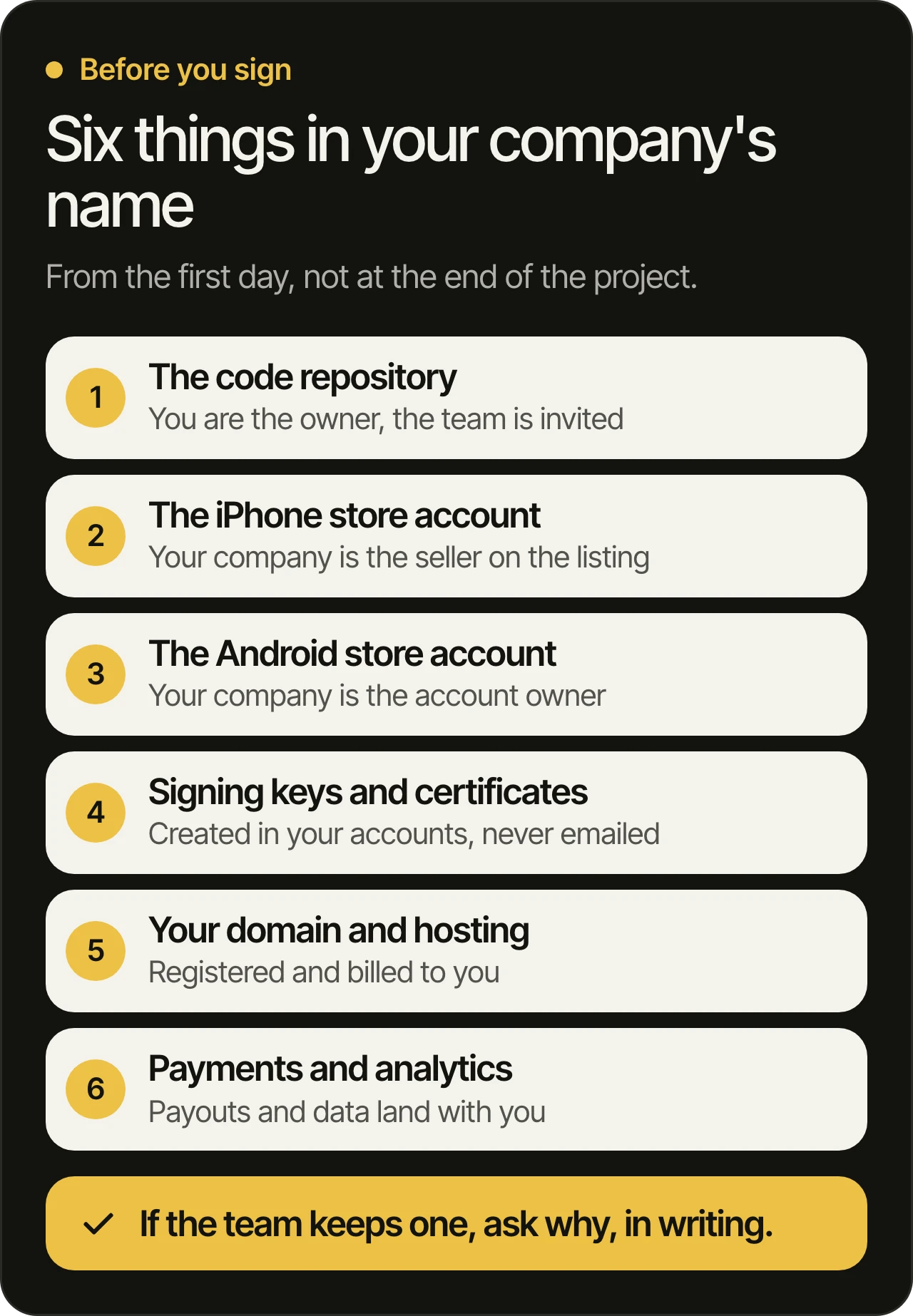
Each one fails in its own way:
- The repository. If the code sits in an account the team owns, you can lose access the day the relationship ends. You should be the owner, and the team should be invited.
- The store accounts. Whoever holds an account decides what is published and who can update the app. A contract that moves the code but says nothing about the accounts leaves the biggest gap.
- The keys and certificates. They prove an update comes from you. The next sections cover them.
- The domain, hosting, payments and analytics. These are easy to forget. A payment account in the team’s name means your customers’ money passes through someone else first.
What do the app stores ask from your company?
Apple and Google both ask an organization to enroll with a D-U-N-S Number, a business identifier from Dun & Bradstreet. Apple also requires a legal entity, not a trade name, and a person with the authority to sign for it. So the accounts should be opened in your company’s name, with the team beside you.
Here is what the stores say themselves:
- Apple. Its enrollment page (opens in a new tab) says an organization must have a D-U-N-S Number and be a legal entity that can enter into contracts with Apple. It does not accept DBAs, fictitious business names, trade names or branches. The person who enrolls becomes the Account Holder and must have legal authority to bind the organization. The organization’s name is displayed as the seller name of its apps, and the organization needs a public, working website tied to its domain.
- Google. Its Play Console help (opens in a new tab) says that to create a developer account for an organization, you must provide a D-U-N-S number. Applying through Dun & Bradstreet is free, and Google warns about third-party services that charge a fee for it.
Have your company’s registration details and the name of the person who can sign for it ready before the first call. If a team offers to publish under its own account “to save time”, that is the moment to ask the questions in this article.
Who holds the signing keys, and why does it matter?
Signing keys prove that an update comes from you. Whoever holds them can publish updates, and without them nobody can. They should be created in your accounts, kept somewhere you can open, and listed in writing, with who can read each one.
On Android, Google explains the setup in its app signing documentation (opens in a new tab). With Play App Signing, Google holds the app signing key and signs what people download, and that key is meant to stay the same for the life of the app. You keep a separate upload key, and if it is lost, you can request a reset in the Play Console. For an older app that never joined Play App Signing, losing the signing key means losing the ability to update the app.
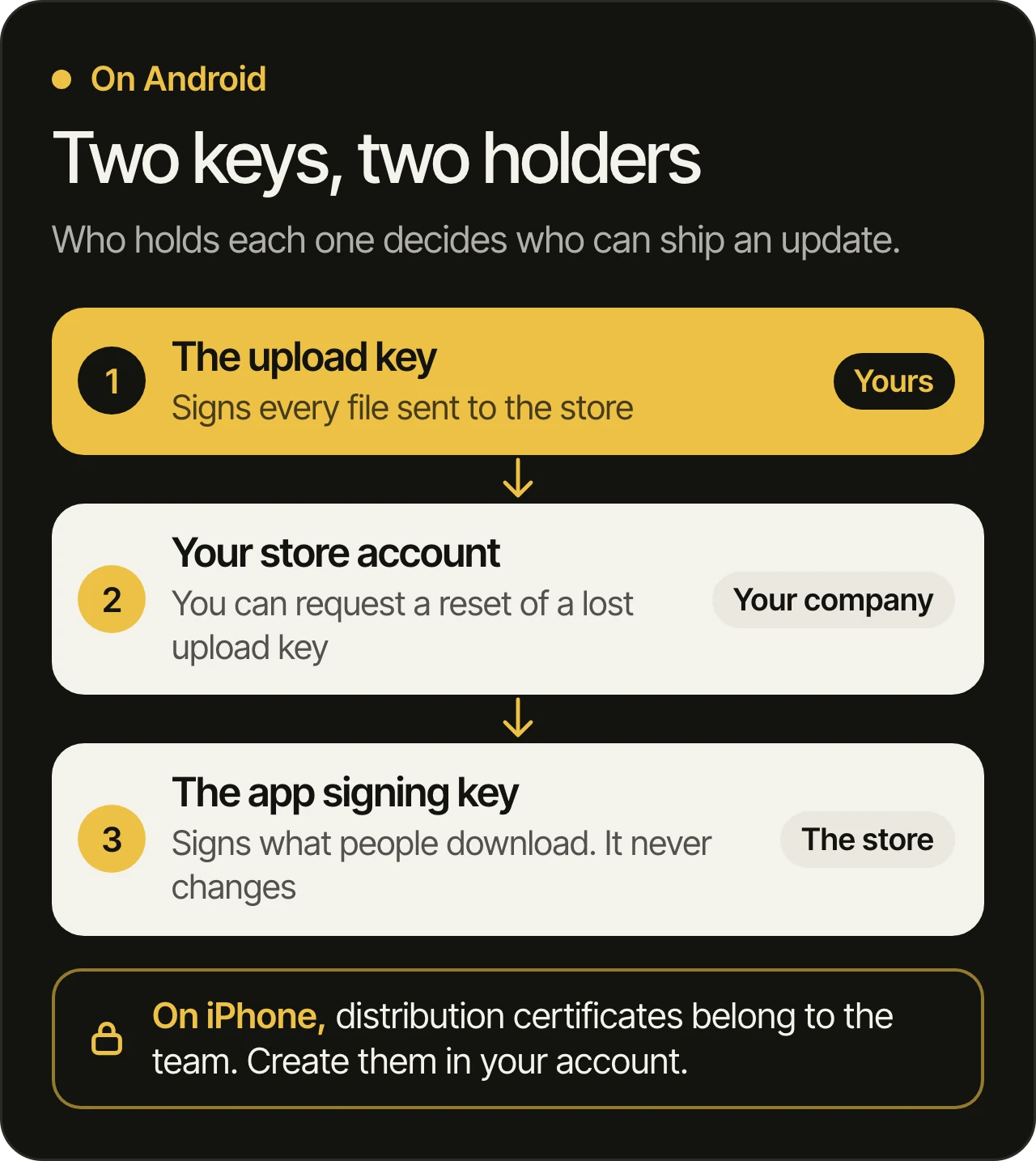
On iPhone, Apple’s certificates overview (opens in a new tab) says distribution certificates belong to the team, and only the Account Holder or an Admin can create them. If a certificate expires or is revoked, new uploads signed with it are blocked, although apps already on the store are not affected.
Ask these before you sign:
- Is the Android app enrolled in Play App Signing inside our account?
- Who created the iPhone distribution certificate, and in which account?
- Where are the key files and their passwords kept, and who can read them?
- Are they ever sent by email or chat?
What if the app is already in an agency’s name?
Move it, but plan the move. Both stores can transfer an app between accounts, and some things travel with it. Others stay behind, so a transfer is a job to prepare, not a button to press. It is far simpler to start in your own name.
- Apple. The Account Holder starts the transfer and the receiving Account Holder accepts it. Per its transfer overview (opens in a new tab), the app keeps its bundle ID, its reviews and its ratings, and users keep receiving updates.
- Google. Its transfer help (opens in a new tab) says users, download statistics, ratings, reviews and the store listing move across. Test groups, bulk export reports and the settings that link integrated services do not.
If you already have an app in someone else’s accounts, what we check first in a takeover shows the order we work in.
How do you check all this before you sign?
Ask for six things, on a call or in writing, before the contract is signed: who builds and reviews, the seller name on a past product, where the keys live, the accounts created in your name, a written handover list and an ownership clause a lawyer has read. Each takes one question.
- Ask who will write your code and who will read each change. Compare the answers across the teams on your shortlist.
- Open the store listing of a product the team built, and read the seller name. If it is not the client’s company, ask why.
- Ask the team to show you how they would create the accounts in your company’s name. A team that does this regularly can explain it in a few minutes.
- Ask where signing keys and passwords are kept and who can read them. The answer should name a place your company can open.
- Ask for the handover list in writing. Every account, every key and every repository you will hold when the work ends.
- Ask that the contract says in plain words that the code belongs to your company. Have a lawyer registered in the UAE read that clause. The contract decides ownership, and this article is not legal advice.
Our own answer is short. With us, code, accounts and store listings are in the client’s name, and a new build comes to try every week. On a takeover, the weekly builds start once the code and accounts are in the client’s name. We have been building products since 2021, and products our team has built are used by more than a million people.
Questions owners ask
Does the team have to be based in Dubai?
Not necessarily. What matters is that you know where the people who write and review your code work, which hours overlap with yours and who answers when something breaks. Some teams have an office in Dubai and build elsewhere. Ours works the same way, with our office in Dubai and our developers working remotely from Beirut, and we say so up front.
Can the agency publish the first version under its own account and move it later?
It is possible, because both stores can transfer an app. It is also extra work, some things do not carry over, and until the move you depend on the team for every update. Publishing under your company’s accounts from the start avoids all of it.
Do we need a registered company to publish an app?
For a business app, yes in practice. Both stores ask an organization to enroll with a D-U-N-S Number, and Apple does not accept trade names. Individual accounts exist, but on the iPhone store your own name is then the seller, and Google describes personal accounts as being for personal use.
Who is responsible for the quality and security of the code?
The team you hire, and you should be able to see how. Ask what is tested automatically, what is reviewed automatically and which person reads each change before it ships. Our answers are in how we test and review every change.
Choose the team that shows you the answers
Teams in Dubai often look alike from the outside. Who builds and reviews your app, and whose name everything is in, are the two answers that set them apart. Ask both before you sign and compare the answers, ours included. You can read about our work in Dubai and how we build mobile apps, or book a free 45-minute consultation, where we go through your product before the call.