Choosing an app development company in Beirut: questions to ask
Shortlisting app developers in Beirut? The questions to ask on the first call, what a good answer sounds like and the warning signs to watch for.
· 10 min read
You are choosing an app development company in Beirut, and your shortlist came from a search, a directory or an AI assistant’s answer. Every company on it says it is experienced. A list cannot tell you which one is right for you, but a first call can: how a team answers a handful of plain questions shows you how it works. MobiStack Digital takes over, fixes and builds mobile apps and web platforms, and these are the questions we would ask if we were in your seat.
In short
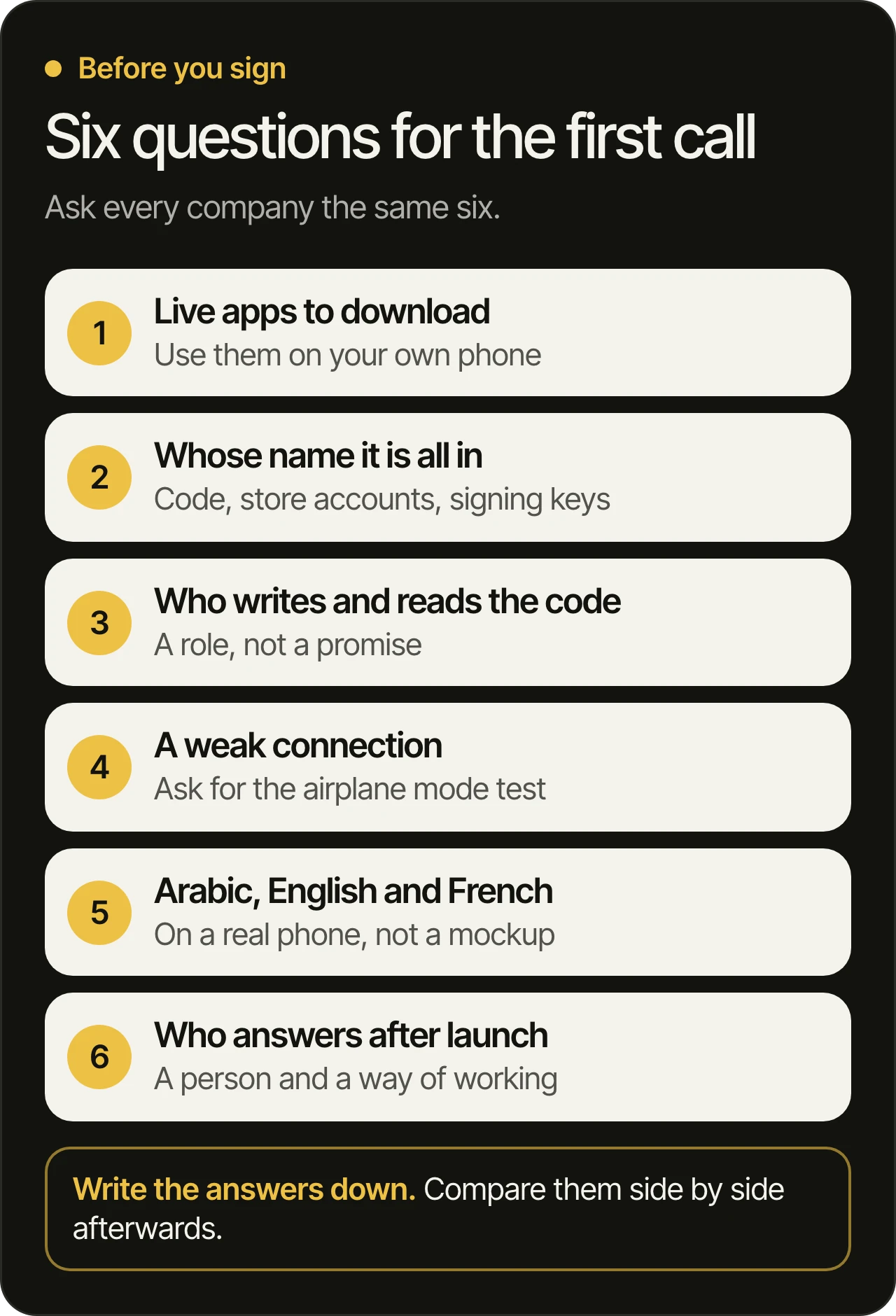
- A list shows who exists. A call shows who is right. Ask each company on your shortlist the same questions, in the same order, and compare the answers.
- Ask for apps you can download. Use them on your own phone, then ask who built them and what has changed since launch.
- Ask whose name everything will be in. The code repository, the Apple and Google developer accounts, the store listings and the signing keys should belong to your company from the first day.
- Test the app, not the pitch. Try it on a weak connection and in Arabic, English and French, and ask for a new build to try every week.
Why can’t a list tell you which Beirut company to choose?
A list can show you who exists and what they say about themselves. It cannot show you who will answer when your app breaks, whose name your accounts are in, or whether the app works on a weak connection. Those get checked on a call and on your own phone, so that is where to spend your time.
Use search results, directories and AI answers for what they are good at: building a shortlist of two or three. Then stop reading about the companies and start asking them the same questions. Write the answers down. Differences that are hard to see on a website show up quickly when three teams answer the same question.
Which apps can you download and use today?
Ask each company for two or three live apps you can download today, and use them on your own phone. A screenshot proves little. A live app in the store shows how the team’s work holds up with real users. Then ask which parts of that app this team built, and what has changed since launch.
On the store listing, look at three things:
- The publisher name. Whose name is shown as the seller?
- The update history. Does the app get regular updates, or did it stop?
- The reviews, and whether the owner replies. Complaints are normal. Silence is the signal.
A good answer is a short list of live products and an honest account of what the team did on each one. A warning sign is a portfolio of images with nothing you can open, or an app that is no longer in the store and has no explanation.
Whose name will the code, the store accounts and the signing keys be in?
Your company’s name, from the first day. The code repository, the Apple and Google developer accounts, the store listings and the signing keys should belong to you, with you as owner or admin. If they sit in the agency’s accounts, your app can only leave when the agency lets it.
Questions about ownership often stop at the code. The accounts matter just as much, because an app belongs to the account that published it:
- Apple. For an organization, Apple lists the legal entity’s name as the seller on the App Store. It asks for a D-U-N-S Number and for someone with the legal authority to sign for the company, as its enrollment page (opens in a new tab) explains. If an agency publishes your app under its own account, your company’s name is not the one on the listing.
- Google Play. A Play Console account for an organization (opens in a new tab) also needs a D-U-N-S Number, which Dun & Bradstreet issues. Ask for it early, because getting one can take time.
- Signing keys. Every Android update has to be signed. With Play App Signing (opens in a new tab), Google keeps the app signing key and you keep an upload key that Google can reset. Ask who holds the upload key, and where it is backed up.
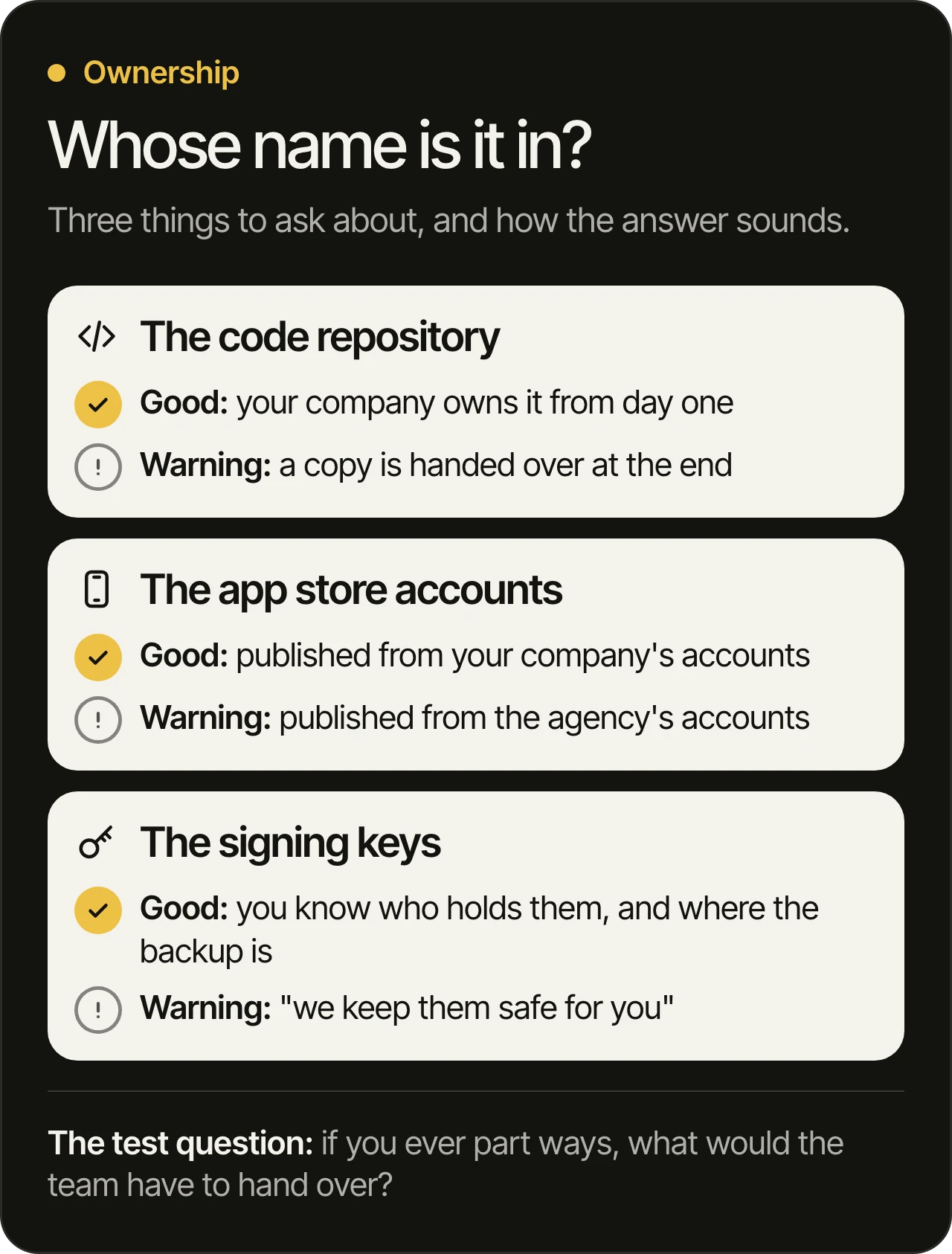
Then ask one question that tests all of it: if you ever part ways, what would the team have to hand over? The right answer is nothing, because everything is already in your name. If it is not, taking an app over from another developer is possible, but it is slower and depends on the old team’s help.
Who will write the code, and who reads it before it ships?
Ask for the roles of the people who will work on your app, and where they work. Then ask who reads each change before it ships. A good answer names a role that reads every change, not a promise that the whole team is careful. If part of the work goes to freelancers or to another company, you should hear that before you sign.
Two follow-ups are worth the time:
- How is a change tested? A good answer mentions automated tests that run on every change and a person who reads the result.
- What happens to a change nobody reviewed? At MobiStack Digital, a change nobody read does not ship. Our developers build with AI and review every line, and how we test and review every change is written down so you can compare it with any other team’s answer.
Does the app keep working on a weak connection?
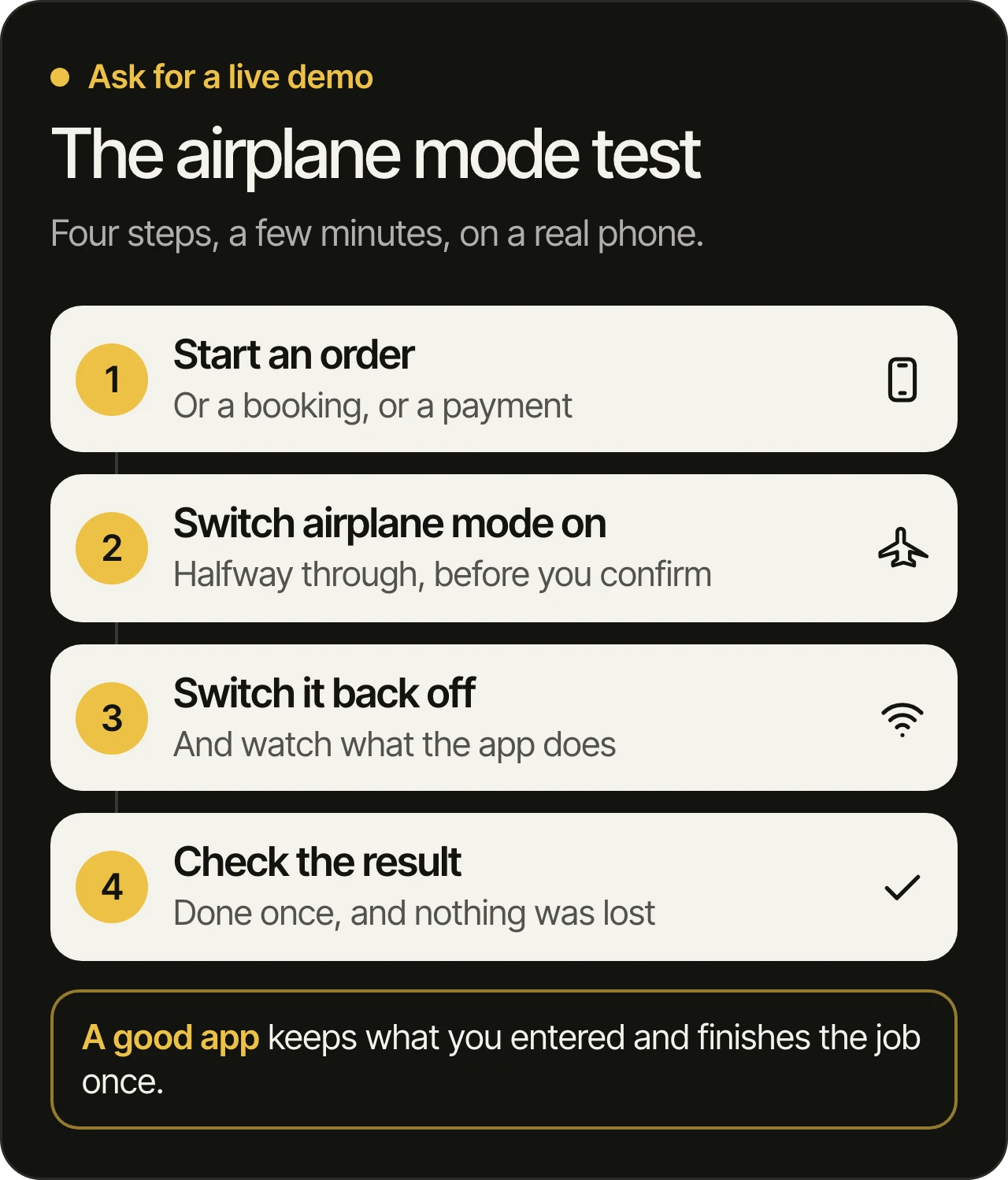
Ask the team to show you. Put the phone in airplane mode halfway through an order, a booking or a payment, then turn the connection back on. A good app says what happened, keeps what you entered and finishes the job without repeating it. A weak one freezes, loses your input or does the same thing twice.
In Lebanon, connections drop and the power goes out, so your customers will meet this. It is far easier to plan for it in the first screens than to add it later. Ask:
- What does the app save on the phone while the connection is down?
- What happens to a payment or an order that was in progress?
- Are the screens built to load in stages, so something useful shows up on a slow connection?
- Is there a clear retry, or does the user have to start again?
If you are building a web platform instead of a mobile app, ask the same questions about the site: does it load on a slow connection, and does a form keep what you typed when the connection drops?
Will it read well in Arabic, English and French?
Ask to see the product in Arabic on a real phone, not in a mockup. Arabic reads right to left, so the layout mirrors: menus, back arrows and progress bars. Then switch to French and English and check that nothing is cut off. A team that has built in all three will show you without preparing.
Things worth checking on that phone:
- A name written partly in Arabic and partly in Latin letters, on a form and on a receipt.
- French text, which usually runs longer than English, inside buttons and tabs.
- The keyboard, the date and the way numbers are shown, in each language.
- The store listing itself, in each language you sell in.
Consultations at MobiStack Digital are in Arabic, English or French, and the about page says so. Ask any team you are considering to speak to you in the language you will work in.
How will you see progress before launch?
Ask when you will first hold a working version. A good answer is a new build to try every week, on your own phone or browser. Weekly builds let you correct course while changes are still small, instead of finding out at launch that the app is not what you meant.
A demo and a build are different things. A demo is a screen share. A build is something you install and use yourself. Ask which one you will get, how often, and how you give feedback. A team that works in the open is easy to follow, and our process shows how we work with you.
Who answers after launch?
Ask who fixes a crash, who handles a store rejection, and who updates the app when Apple or Google change their requirements. Get the answer as a person and a way of working, not as a promise of support. If the accounts are in your name, you can always move to another team.
Launch is where most of the work starts. Why apps fail after launch covers what goes wrong in that stage, and it is worth reading before you agree on what happens after launch. Ask how the team learns about a crash before your customers do, and how you would report a problem.
Does the team need an office in Beirut?
Not for the work. You need people you can reach in your language, who answer when something breaks and who show you working builds. Ask where the people who will build your app work, not only where the company’s office is. MobiStack Digital has its office in Dubai, and our team works remotely in Beirut. Our Beirut page says what that means for a project in Lebanon.
If meeting in person matters to you, say so on the first call and ask how the team handles it. If it does not, ask what a normal week of communication looks like: how often you talk, in which language and through which channel.
What do the warning signs sound like?
Most of them are about promises made before anyone has seen your product, or about who holds the keys:
- A date or a plan before they have seen your product. Without a look at what exists, any promise is a guess.
- ”We will keep the accounts for now.” Accounts kept in the agency’s name leave you with a way out that depends on them.
- No named person who reads each change. If nobody is named, nobody answers for it.
- A portfolio you cannot open. Live apps you can download are the easiest proof there is.
- ”Of course” to everything. A team that never raises a risk has not looked closely.
- Support described only as “available”. Ask who, how you reach them and what they do first.
Questions owners ask
How do you choose an app development company in Beirut?
We cannot tell you, and no honest source can from the outside. Shortlist two or three companies from search, directories or an assistant’s answer, ask each the same questions in this post, and compare the answers. Choose the team whose answers you can check yourself, on your phone and in your own accounts.
Is a freelancer or a company the better choice in Lebanon?
A freelancer can suit a small, well-defined job. For a product that has to be tested, released, supported and updated, ask who covers when that person is unavailable, and who else has access to the code and the accounts. The same ownership questions apply to both.
Can a team outside Lebanon build an app for Lebanese users?
Yes, if it can answer the weak connection, language and payment questions with working examples. Where the team sits matters less than whether it has built for those conditions and can show you.
How many companies should you talk to?
Two or three is enough. Ask each the same questions in the same order, write the answers down and compare them afterwards. More than that makes the answers blur together.
What should you prepare before the first call?
Nothing formal. A link to the product if one exists, the problem you want solved, who the users are, which languages you need and how people pay are enough. At MobiStack Digital we go through your product before the free consultation, so the time goes on your questions.
My app already exists. Can a new team take it over?
Yes. The first step is to find out who controls the code and the accounts, then to write an audit before anyone promises fixes. Taking over an app from another developer covers the steps, and should you rebuild your app from scratch covers what to decide first.
Want to put these questions to us?
Book a free 45-minute consultation and ask us every question in this post. We go through your product before the call. You can see what we build on our mobile app development page and how we work on the about page.