Should you rebuild your app from scratch? How to decide
Told your app needs a rebuild from scratch? How to tell whether it needs a few fixes, a new team or a rebuild, and what a rebuild must keep.
· 8 min read · Updated
Your app or web platform is live, but it is slow, it keeps breaking or it looks dated, and someone has told you it has to be rebuilt from scratch. Before you agree, it helps to know what a rebuild solves, what it puts at risk, and how to tell which of three paths your product needs: a few fixes, a new team or a rebuild.
In short
- Most live products can be fixed where they stand. A rebuild throws away what already works and what your users already know, and the current product still needs care while the new one is built.
- If nobody can build, release or explain the product, start with the team and the access. A takeover begins with a written audit, and the audit shows whether any part needs rebuilding.
- A rebuild makes sense in a few cases: the technology can no longer be updated, the business needs the product to do a different job, or a part would take more work to fix than to replace.
- If you do rebuild, go one part at a time and keep what people rely on: the same app and store listing, their accounts and data, and your web addresses or a redirect for each.
Why a rebuild is so often the first suggestion
A rebuild is an easy thing to suggest. Code someone else wrote looks worse to a new developer than it is: it follows habits they do not share, and they cannot yet tell which odd piece is a mistake and which one fixes a problem they have not met. Starting again feels cleaner than learning all of that. Code is also easier to write than it used to be, which makes starting again look easier than it is.
Writing the code was never the hard part of a rebuild. The new product has to do everything the current one does, including what nobody wrote down:
- the small fixes for one kind of phone, one payment method or one unusual account, each added after a complaint
- the business rules hidden in screens, emails and reports
- the data your users have built up, and the way they sign in
- what your users have learned: where things are, and how they work
Each of these has to be found, built again and checked again. Meanwhile your customers still use the current product every day, so it still needs fixes, and until the new one replaces it, you have two products to look after.
Three paths: a few fixes, a takeover or a rebuild
Owners usually hear about two options, fixing the product or rebuilding it. There is a third: keep the product and change who looks after it.
- A few fixes. The team you have can build and release the product, and the problems sit in a few places: crashes on one screen, a signup that loses people, a slow search. The work is to decide what to fix first and fix it in that order, with tests so each fix stays fixed.
- A takeover. The problem is the team or the access. The agency has gone quiet, nobody can release an update, or nobody can explain why the product breaks. A new team takes the product over as it is, and you plan with them how the code and accounts move into your name. At MobiStack Digital, every takeover starts with a written audit, and you read it before we fix anything. Here is what we check first.
- A rebuild. The product cannot do what the business needs next, whoever works on it. Some of it, or all of it, is replaced with new code, one part at a time where possible.
The questions that decide it
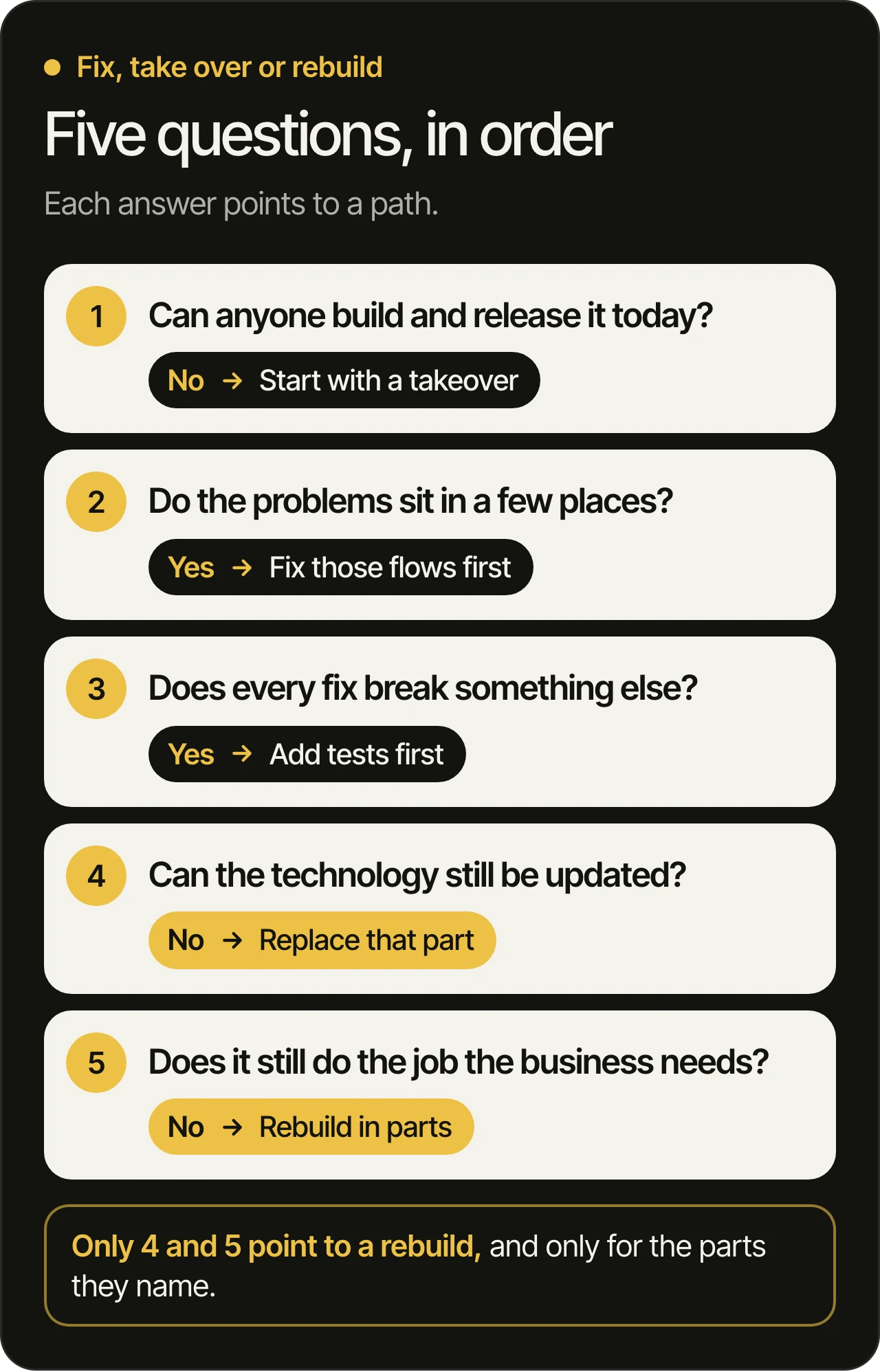
Ask them in this order. Each answer points to a path.
- Can anyone build and release the product today? If not, start with a takeover. Nobody can judge code they cannot build, so access and a written audit come first.
- Where do people stop, and why? Crash reports, store reviews and your analytics show it. If the problems sit in a few flows, fix those flows. A rebuild would carry the same decisions into new code.
- Does every fix break something else? That usually means the product has no tests. Tests can be added to the product you have, starting with the parts that change most, and each one makes the next fix safer.
- Can the technology still be updated? Both stores raise their requirements over time. Google Play stops showing apps that fall behind its target requirements to new users on newer versions of Android, and Apple only accepts uploads built with a recent version of its own tools. Usually a product can be brought up to date in steps. A part built on something nobody maintains any more has to be replaced.
- Does the product still do the job the business needs? If the business has changed, say from one-off sales to subscriptions, or from one shop to many sellers, the product may need a new shape. That is a reason to rebuild the parts that serve the new job.
What a rebuild has to keep
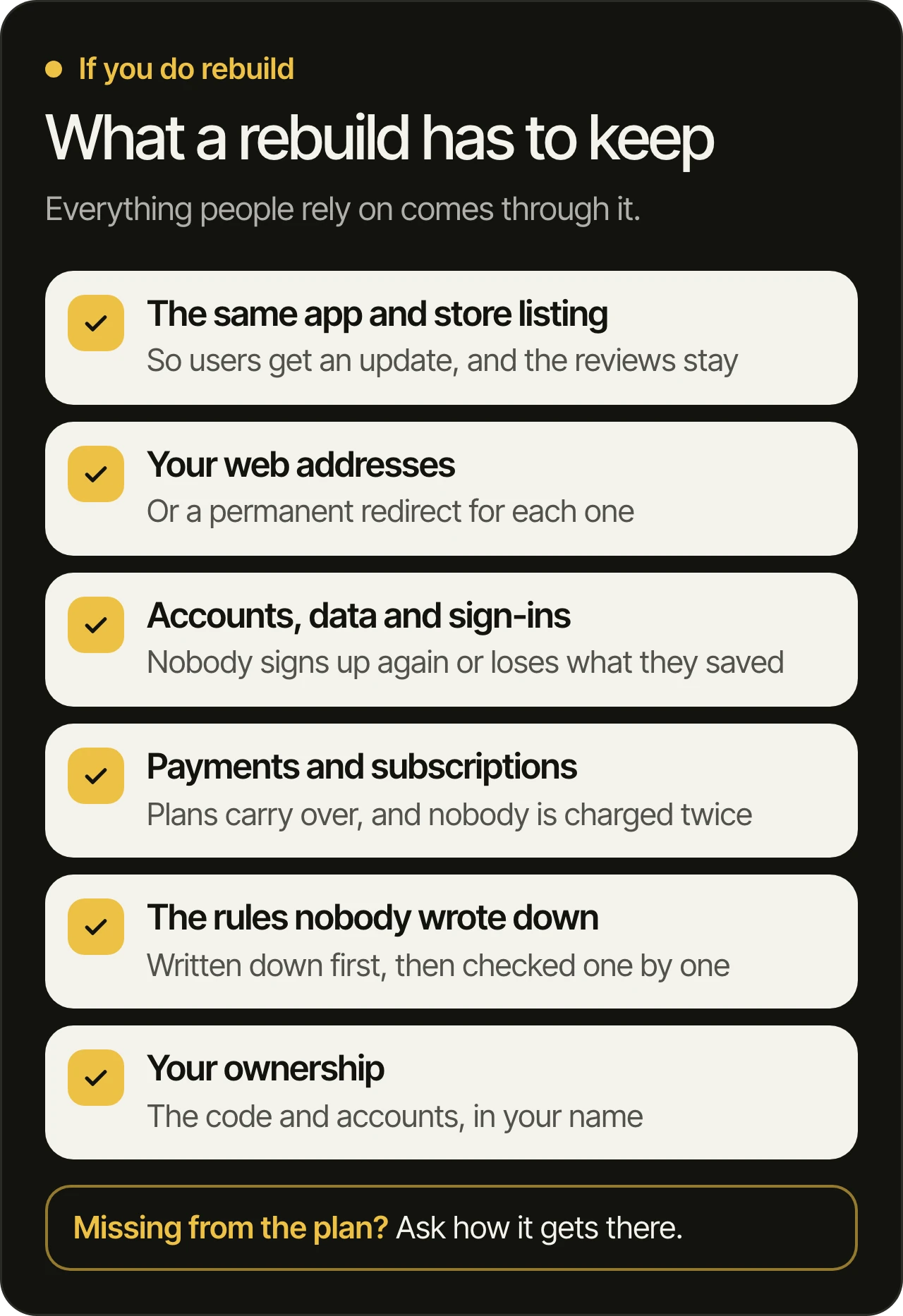
If the answers do point to a rebuild, the work is bigger than the new code. Everything your users and your business rely on has to come through it:
- The same app. On Google Play, a new version has to use the same application ID and signing certificate as the published app, and Google’s developer documentation (opens in a new tab) is plain about it: change the ID, and the store treats the upload as a completely different app. On the App Store, an app’s bundle ID (opens in a new tab) cannot change once a build has been uploaded, so the rebuilt app goes up as a new version of the same app. Users get it as an update, and the listing keeps its reviews.
- Your web addresses. When a web platform’s pages move to new addresses, Google recommends a permanent redirect (opens in a new tab) from each old address to its new page, so links and search results still lead somewhere.
- People’s accounts and data. Nobody should have to sign up again or lose what they saved. Moving the data is part of the rebuild, and it gets tested like the code.
- Payments and subscriptions. Subscribers should keep their plan, and nobody should be charged twice.
- The rules nobody wrote down. Write the small fixes and business rules down before the rebuild starts, and test the new product against that list.
- Your ownership. The new code lives in a repository your company owns, and every account stays in your name.
If you rebuild, rebuild in parts
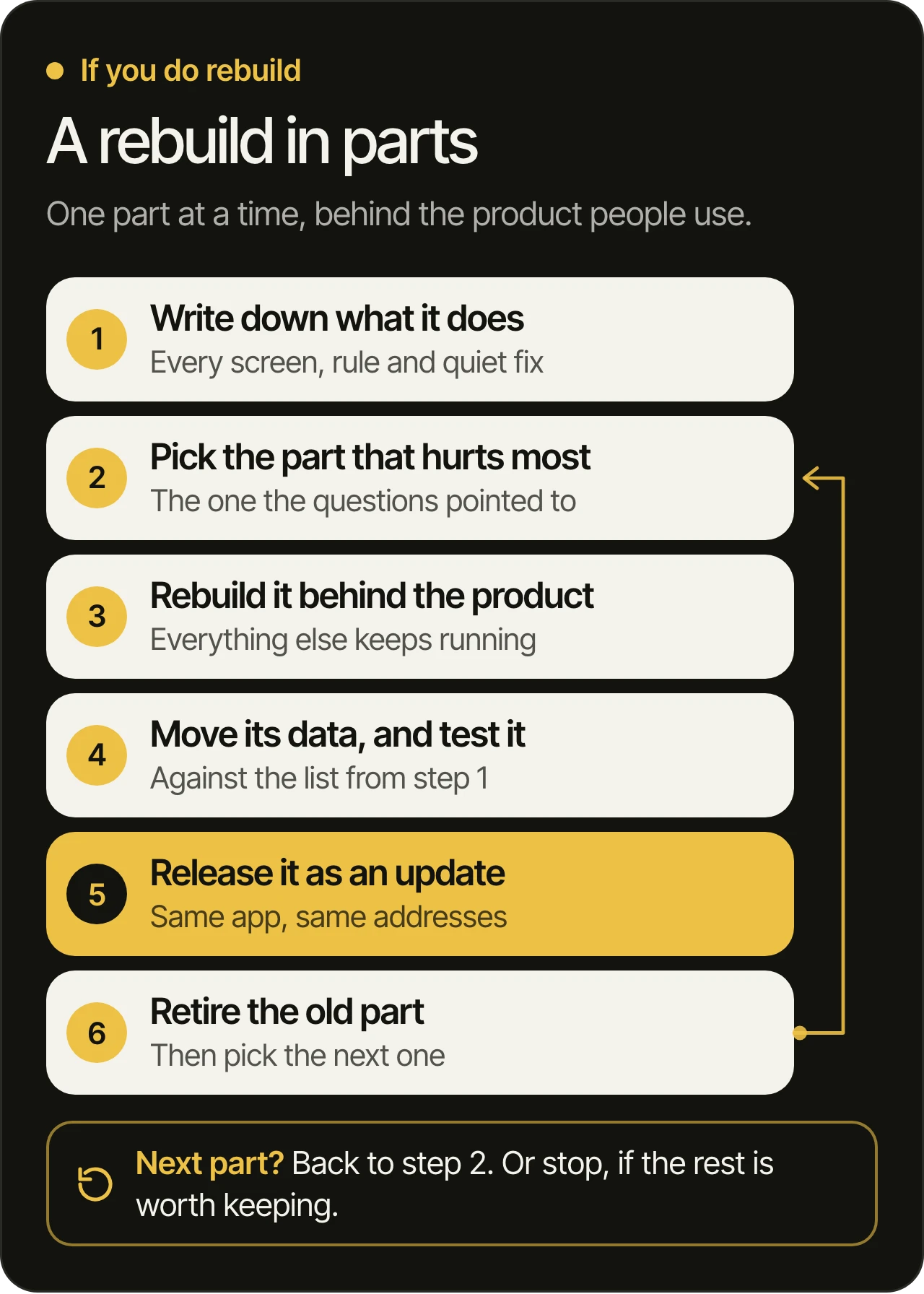
Replacing a whole product in one go means a long stretch with no improvements for your users, then one large release that changes everything at once. Rebuilding one part at a time avoids both:
- Write down what the product does today, screen by screen, with the rules and fixes nobody documented.
- Pick the part that hurts most: the one the questions above pointed to.
- Rebuild that part behind the product people already use, so everything else keeps running.
- Move its data and test it against the list from the first step.
- Release it as an update to the same app and the same addresses, and watch what people do with it.
- Retire the old part, then pick the next one. Or stop there, if the rest is worth keeping.
Our developers build with AI and review every line. Each rebuilt part ships as an ordinary update, with the same tests and the same review as any other change.
Questions to ask before you agree to a rebuild
Whoever recommends a rebuild, ask them to answer these in writing:
- Which problems will a rebuild solve that fixes cannot?
- Which parts of the current product are worth keeping?
- How do users, their data and their sign-ins move to the new product?
- Will it ship as an update to the same store listings and web addresses?
- Who looks after the current product while the new one is built?
- Can it be done one part at a time, and if not, why not?
Specific answers mean the recommendation has been thought through. If the answers are vague, ask for a written audit of the product before you decide.
Questions owners ask
How do you know if an app needs to be rebuilt?
When the technology can no longer be updated, when the business needs the product to do a different job, or when an audit shows that a part would take more work to fix than to replace. Slow screens, crashes and a dated design are rarely enough on their own, because each of them can usually be fixed in the product you have.
Will we lose our users and reviews if we rebuild?
Not if the new version ships as an update to the same app. That means keeping the app’s identity: the same bundle ID on the App Store, and the same application ID and signing certificate on Google Play. A new listing would start without reviews, and every user would have to install it again.
Is a redesign the same as a rebuild?
No. A redesign changes how the product looks and works for the people using it, and a rebuild replaces the code underneath. A product that looks dated can usually be redesigned on the code it already has, starting with the flows where people give up.
Can a new developer work with code someone else wrote?
Yes. That is what a takeover is: the new team learns the code, writes down what it found and fixes it in order, with tests so the fixes stay fixed. Unfamiliar code is harder to read at first, and that alone is no reason to replace it.
Does AI make a rebuild easier?
It makes code easier to write. It does not tell anyone what the current product does in every case, move your users’ data or keep your store listings and web addresses, and those decide whether a rebuild works. AI changed how code gets written. It did not change who answers for it.
Not sure which path your product needs?
Book a free 45-minute consultation. We go through your product before the call, then show you what we would fix first, what we would keep, and how. You can also see what a product takeover includes, or read about our services and how we work.