What goes into the first version of an app, and what waits
Planning the first version of your app, or MVP? How to choose what goes in, what waits, and what the first release has to prove, without guessing.
· 9 min read
You have an idea for an app and a feature list that keeps growing. The first version of an app should do one job well enough that real customers use it, and everything that does not serve that job waits. MobiStack Digital takes over, fixes and builds mobile apps and web platforms, and here is how to decide what goes into a first version, what waits, and how you know it is ready for real users.
In short
- Name the one job. The first version proves one thing: that the people you built it for will do the main action in your app, such as sign up and book. Write that sentence before you list a single feature.
- Keep the path, hold the rest. Sign-in, the main action, payment if your business takes payment in the app, and what the stores require go in. Extra roles, loyalty points, chat and settings screens wait.
- Count from the first day. Decide what you will measure before launch, so the first real users answer your question.
- Ship to real users early, then improve every week. A first version is the start of a rhythm. What you learn from it decides what comes next.
What is the first version of an app for?
The first version of an app exists to find out whether real people will use it for the job you built it for. It is often called an MVP, a minimum viable product. It is small on features and complete on that one job, so what you learn is about your idea, not a missing screen.
A first version that is too big takes so long that you learn whether the idea works late. One that is too thin loses people for reasons unrelated to your idea, so you learn nothing. Aim between them: everything the one job needs, and nothing else.
A first version is also not a demo. Apple’s App Store Review Guidelines (opens in a new tab) say that demos, betas and trial versions do not belong on the App Store, and point to TestFlight for testing. What you submit to the store should be a real app that real people can use.
How do you choose the one job it must do?
Write one sentence: who the app is for, what they do in it, and what tells you it worked. “Clinic patients book a visit and arrive” is a job. “A platform for health” is a theme. If the sentence needs the word “and” twice, you are describing two apps, and the first version carries only one of them.
Test the sentence with three questions:
- Who exactly is the first user? Name a type of person you could find this week, not “everyone”.
- What do they do in their first minutes? That is the path the first version has to make smooth.
- What would you see after a few weeks if it worked? That is the measure, and it comes before any design.
If you cannot answer the third question, the business reason is not clear yet, and no feature list will fix that. Start with what the product has to do for the business, as we describe in why apps fail after launch.
Which features go in, and which wait?
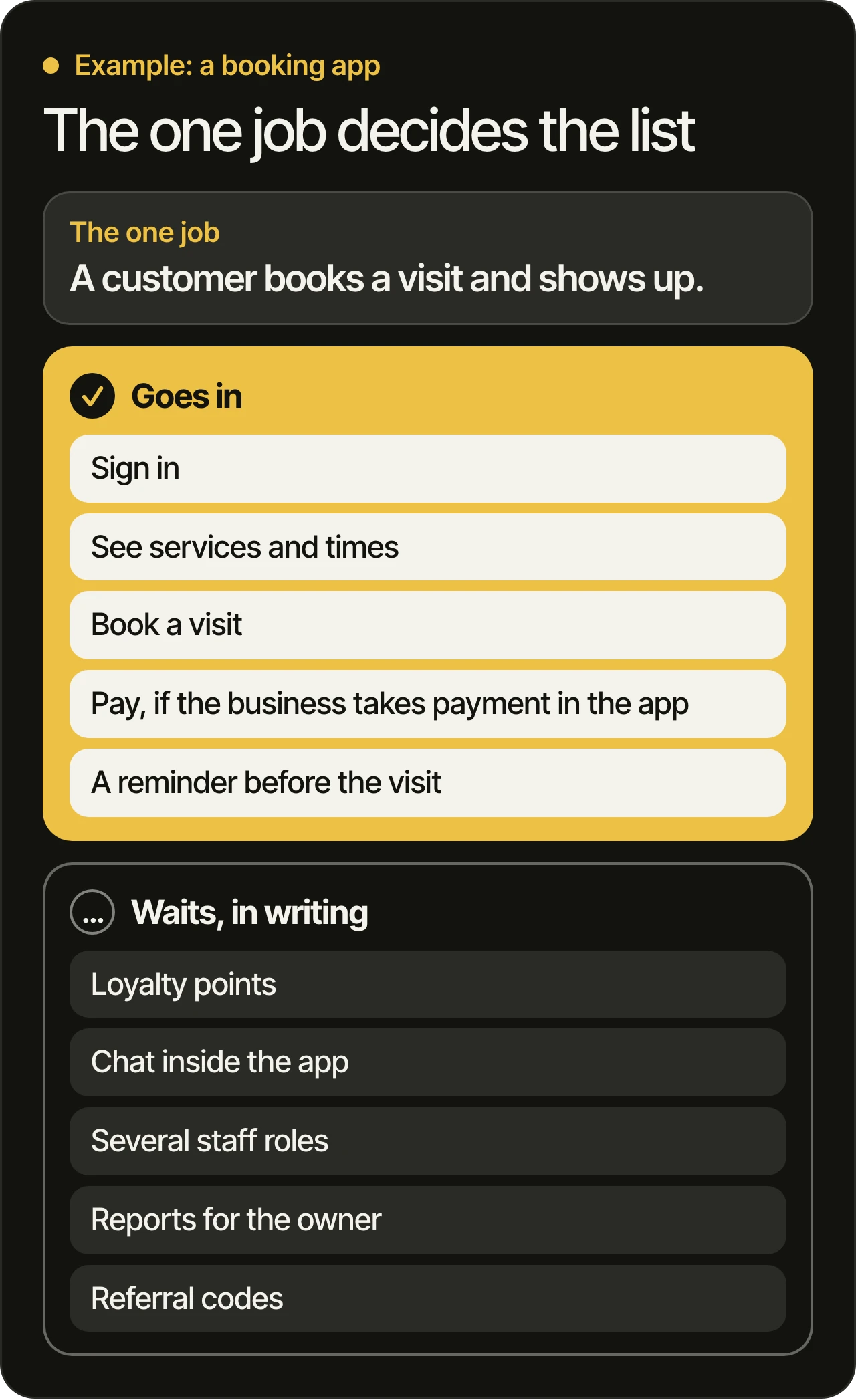
A feature goes in when a first-time user cannot finish the main job without it. Usually that is sign-in, the main action, payment if the business takes payment in the app, a way to reach you, and what the stores require. Features that only make the app nicer, bigger or more personal wait.
Go through your list one feature at a time and ask: can a new user finish the main job without this? If yes, it waits. Write it down with the reason, so it is not forgotten and not argued about again.
Some things are part of the job
The line moves with your customers. If they read Arabic, Arabic belongs in the first version, because language and direction touch every screen and are hard to add later. If your customers often have a weak connection, the app has to cope with that from the first release.
What waits in most first versions
- Several kinds of user with different permissions, beyond what your first customers need.
- Loyalty points, referral codes and badges.
- Chat inside the app, when email or a phone call does the job for now.
- Detailed profiles and long settings screens.
- Custom reports for you. Counting still starts on day one; the reports wait.
- Connections to other systems, unless the main job cannot work without them.
What does the first version still need so the stores accept it?
Both stores review a first version like any other, and neither accepts a placeholder. Apple asks for a final version with working links, no placeholder text and a demo sign-in if the app has a login. Google Play asks for a privacy policy link, declarations about ads, audience and content rating, and sign-in instructions for reviewers.
We read both pages on 13 November 2026. They change, so open them again when you submit.
Apple’s guidelines say, in section 2.1, that a submission should be a final version with “all necessary metadata and fully functional URLs”, with placeholder text and empty websites scrubbed, and demo account details if the app has a login. Section 4.2 says an app should include features, content and UI that “elevate it beyond a repackaged website”, and 4.2.2 adds that apps should not primarily be marketing materials or a collection of links.
Google Play’s help page, Prepare your app for review (opens in a new tab), says you must link a privacy policy on your listing and inside the app, declare whether the app contains ads and which age group it targets, and give reviewers sign-in instructions if needed. Apps without a content rating may be removed.
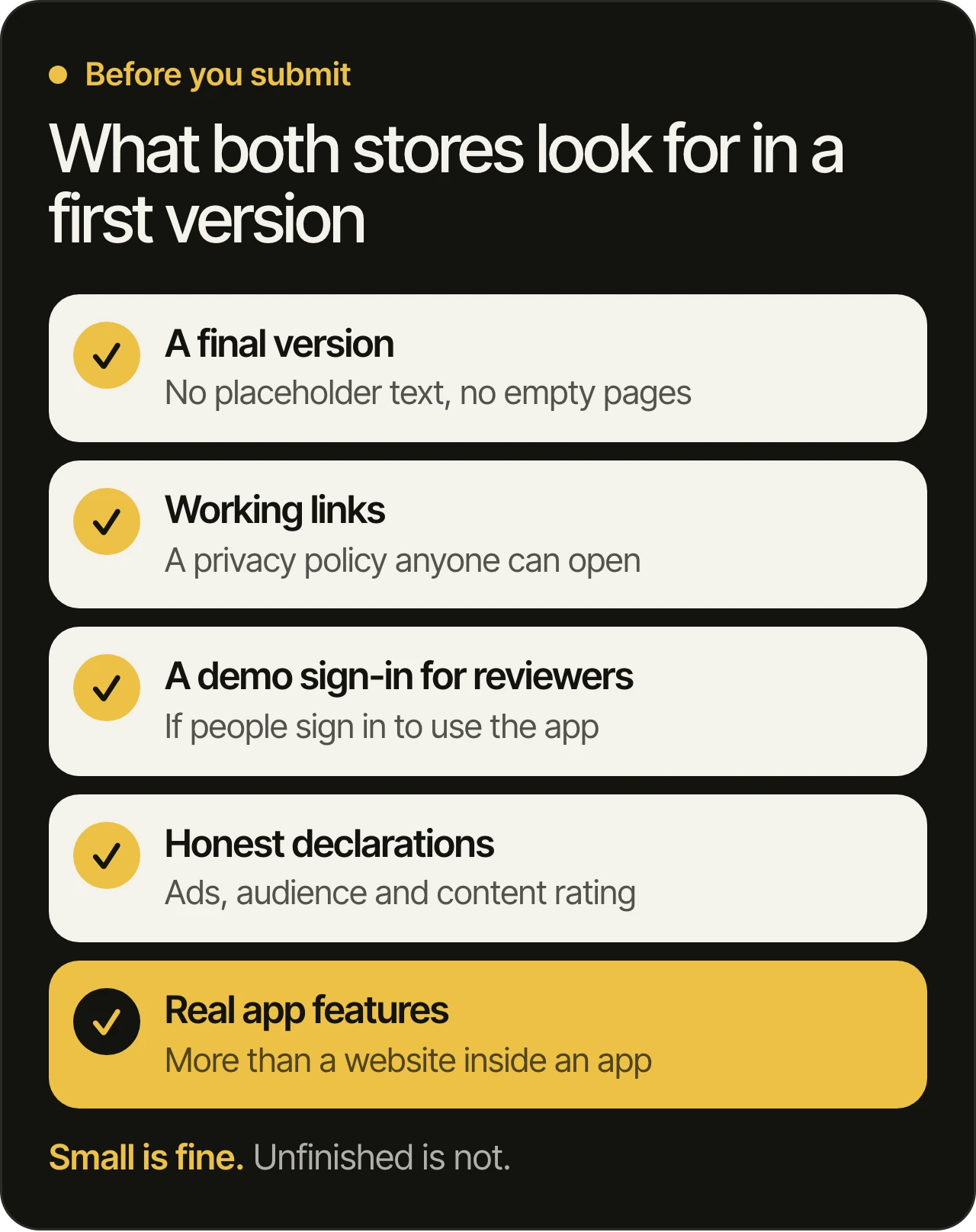
A small first version passes these checks as easily as a large one. The risk is leaving them for the last day, so put them on the plan from the start.
What has to be measured from day one?
Count the steps of the one job: how many people install the app, sign up, do the main action and come back. Decide those counts before launch and build the tracking into the first version, because the first users cannot be counted afterwards. Add crash reporting too, so you see what breaks on real phones.
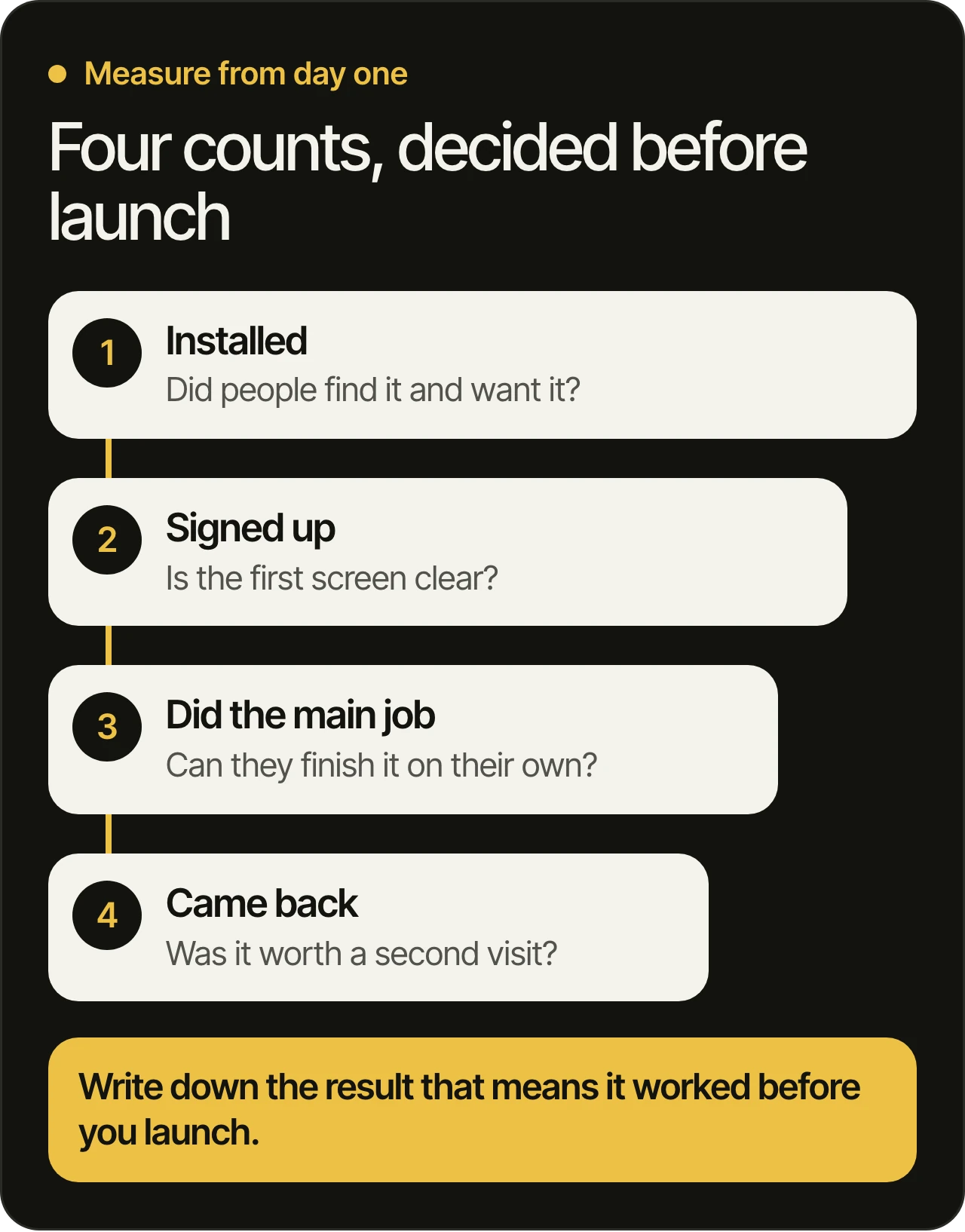
Each drop between two counts points at a different cause. People who install and do not sign up point at the first screen. People who sign up and do not finish point at the path. People who finish once and never return point at the value.
Store reviews are the other source: they list what real users meet, by version. We cover how to read them in how to analyze app store reviews. And write down, before launch, the result that would make you say the first version worked. A line drawn first keeps the decision honest.
What makes a first version hard to grow later?
A small first version is fine. The ones that are hard to grow share a few early choices that are easy to make and hard to undo: code and accounts in someone else’s name, no automated tests, one language and one layout direction baked into every screen, and a release process only one person understands.
- Accounts in your name. The developer accounts for the stores, the code repository, the cloud project and analytics should belong to your company from day one. Most things can be fixed later; an account held by someone else can be hard to get back. We cover what that looks like in taking over an app from another developer.
- Tests. Tests are what let a team add the next feature without breaking the earlier ones. Every change we make passes automated tests and automated code review, and one of our developers reads it before it ships.
- Language and direction. Decide them on the first screen, not on the tenth.
- A release anyone can run. If shipping an update depends on one person’s laptop, every later change carries risk.
With these foundations, adding features later is routine work. Without them, teams reach the point described in should you rebuild your app from scratch.
How do you know the first version is ready for real users?
It is ready when a person who has never seen it can finish the one job on their own phone without help, and when the team can ship a fix if something breaks. Test it first with a small group of real users through a test release, then submit to the stores. Apple’s TestFlight (opens in a new tab) takes up to 100 internal testers and up to 10,000 external ones, and Google Play’s internal testing (opens in a new tab) takes up to 100 testers.
A short checklist before you release:
- A new person finishes the main job without anyone explaining it.
- It runs on an older phone and on a weak connection, and in Arabic if your customers read Arabic.
- Every count from the section above is tracked, and crash reporting is on.
- The store listing, the privacy policy and the review answers are ready, and a demo sign-in exists if the app has a login.
- The accounts and the code are in your name.
- You know what next week’s build will change.
That last line matters most. At MobiStack Digital, you get a new build to try every week, so you see the first version take shape on your own phone, and you can move a feature in or out of it while changes are still small. Our process explains how the weeks run.
Questions owners ask
Is a prototype the same as a first version?
No. A prototype is a clickable model of the screens, made to test the flow before anything is built. A first version is a real app that real people install and use. A prototype is a good step before building, but only a first version tells you whether people will use the product.
Should the first version be on iOS and Android?
It depends on where your customers are. Look at which phones your own people use, from your website analytics or a few conversations, and start there if one platform clearly leads. If both matter, one codebase for both stores is a common choice, and our mobile app development page explains the options.
Can we add features later without a rebuild?
Yes, if the first version was built with tests, a clean release process and accounts in your name. Features then arrive as normal weekly work. Without those foundations, each new feature risks breaking an older one, and a rebuild starts to look attractive.
Who owns the first version’s code?
You do. Code, accounts and store listings are in your name from the first day, and that is part of how we work. If you ever want a different team to continue, you can hand over everything yourself.
What should we prepare before talking to a team?
Bring the one-sentence job, your feature list in rough order, who the first users are and how you will reach them, and the name of the company that will own the app. A rough list is enough, and it gives the consultation something concrete to work from.
Planning your first version?
Book a free 45-minute consultation. We go through your product before the call. We have been building products since 2021, and products our team has built are used by more than a million people. Our office is in Dubai, and our team works remotely in Beirut. Read more on our mobile app development page and our page for app development in Dubai.