How to judge a UI/UX agency from its portfolio
Choosing a UI/UX agency? How to read a portfolio past the pretty screens: the problem, the decisions, the result, and right to left done well.
· 8 min read
You are comparing UI/UX agencies, in Beirut, in Dubai or across the region, and every portfolio looks good. Polished screens are the easy part to fake, and they tell you little about whether your sign-up or checkout will work better afterwards. MobiStack Digital takes over, fixes and builds mobile apps and web platforms, and this is how we would read an agency’s portfolio if we were buying: what to look for, what to ask, and how to judge Arabic and right to left work.
In short
- Look for the problem, not only the screens. A portfolio you can trust says what was wrong, who had the problem, what the team decided and what changed for the people using it.
- A gallery is not a case study. Finished screens show taste. Only the reasoning behind them shows how the agency works on your product.
- Test Arabic work with real details. Ask what mirrors and what stays, such as digits in a number and logos, and ask to see Arabic screens designed from the start, not flipped at the end.
- Settle build and ownership before you sign. Ask who builds what is designed, and where the design files will live. They should sit in an account your company owns.
What should a UI/UX portfolio show?
A portfolio should show how the agency thinks, not only how its screens look. For each project you want the problem in plain words, the people who had it, the choices the team made and what changed afterwards. Screens are the last part of the story, and an entry that starts with them has skipped the work.
Read each entry in this order:
- The starting point. Was there a live product with a problem, or a blank page? Your situation is probably the first one.
- The evidence. How did the team learn what was wrong: interviews, recordings, support messages, numbers from the product?
- The decisions. What did they change, and what did they decide to leave alone?
- The outcome. What was different for users, in words you could check with the client?
If you own a live product, favor entries that begin with one. Redesigning flows where people give up is a different skill from designing a new product. We look at the same signal in how to analyze app store reviews: the places where people stop are where design work pays back.
How do you tell a case study from a gallery?
A case study answers questions that a gallery never raises. You can tell them apart in one minute by asking five of them of any entry. If the agency can answer them out loud, the work was probably done properly, even when the page does not say so.
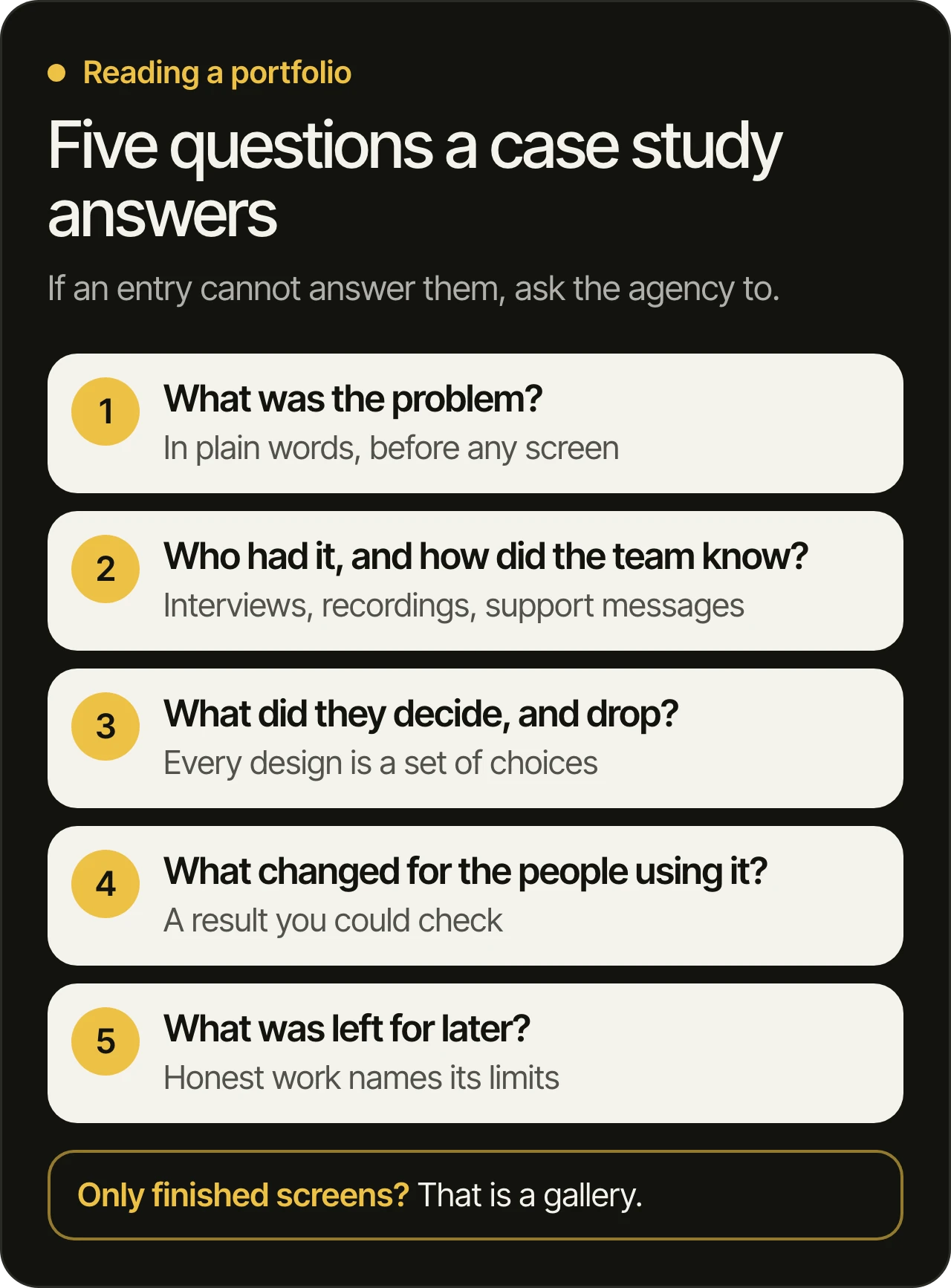
Be careful with two things:
- Concepts are not client work. Many agencies show self-made concepts. They are fine as a display of taste, but only if they are labelled as concepts, and they say nothing about how the agency handles a real client’s constraints.
- Results you cannot check. Large numbers with no source, no date and no client are decoration. Ask who can confirm the result, and what was measured before and after.
What should an agency ask about your product first?
A good agency asks about your business before it opens a design tool. Expect questions about who your users are, where they stop, what the product has to do for the business and what you have already tried. An agency that offers screens in the first call, before it has looked at your product, is guessing.
The questions you should hear:
- Who is the main user, and what do they do in the first minutes?
- Where do people leave, and how do you know?
- What do support messages and store reviews complain about?
- What is fixed and cannot change: your brand, your systems, a deadline from outside?
- Who decides when a design is good enough?
If you have data, bring it. If you do not, a good agency will say how to get it. At MobiStack Digital we go through your product before the free consultation, so the call starts from your product and not from a pitch.
How do you judge Arabic and right to left work?
Good Arabic work is designed in Arabic from the start, with the layout, the alignment and the icons all reversed on purpose. The test is in the details: what flips, what stays and whether the Arabic text looks as carefully set as the English. Ask the agency to show Arabic screens for a real product, and ask what they changed for them.
The platforms publish clear rules. Apple’s right to left guidelines (opens in a new tab) say to adjust text alignment to match the interface direction, and to flip back buttons, next and previous buttons, sliders and progress indicators. They also say not to reverse the digits inside a specific number, not to flip logos or universal signs such as the checkmark, and to avoid flipping photographs and general artwork. Android’s language and RTL guide (opens in a new tab) adds that people who use right to left scripts prefer a right to left interface, with right-aligned text and forward arrows pointing left, and that numbers and embedded English text inside Arabic still need care.
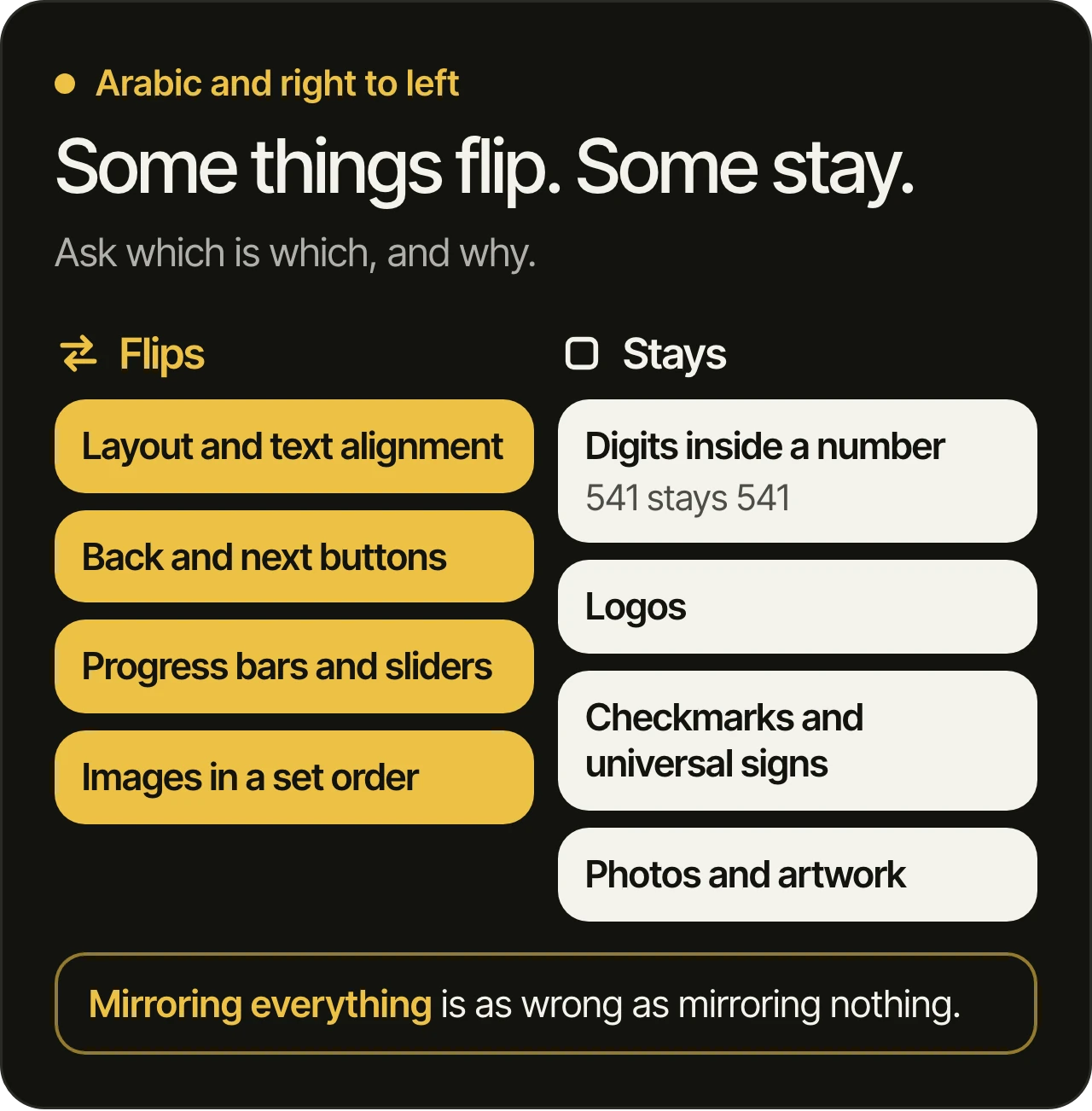
Questions that show whether an agency knows this:
- Which parts of your layout flip, and which do not? A confident answer names specific things, such as progress bars and phone numbers.
- How do you handle a screen with English and Arabic on it? Brand names, product codes and numbers often mix the two.
- Who reads the Arabic? Design is checked by a native reader, not by a translation tool.
- Can we test the Arabic version with Arabic readers? If the answer is no, you are the tester.
What else shows in the screens themselves?
A portfolio hides the unglamorous screens, and those are where a product is won or lost. Ask to see the empty state, the error state, the loading state and a small phone, not only the happy path on a large screen. A team that designed these has thought about real use.
Accessibility is a fair test too. For web platforms, the WCAG 2.2 updates (opens in a new tab) from the W3C added criteria that a designer can check on a mock-up: pointer targets at least 24 by 24 CSS pixels, any action that needs dragging also available with a single tap or click, and sign-in that does not depend on memorizing or retyping a code. Ask whether the agency checks these, and where.
Who builds what the designers design?
A design only helps if it can be built the way it was drawn. Ask whether the agency also builds, works with your developers, or hands over files and leaves. Any of these can work, and each has a different risk: a design that cannot be built, a design that is built differently, or a gap between the two teams.
Ask three things:
- Do designers and developers speak before the design is final? Surprises in the build are easier to remove while the design is still a prototype.
- Is there a design system? A set of colors, type, components and states that developers can use keeps the build consistent.
- Who checks the build against the design? Someone should look at the real app next to the prototype.
On our side, our developers build with AI and review every line, and one of our developers reads every change before it ships. Whoever builds your design, ask them how a change is checked before it reaches your users, and read is code written with AI safe if the question is new to you.
Who owns the design files?
You should own them. Ask where the files will live, who has access and what you receive at the end, and get the answer in writing before the project starts. Files held only on the agency’s account or computer can leave you dependent on that agency the next time you want a change.
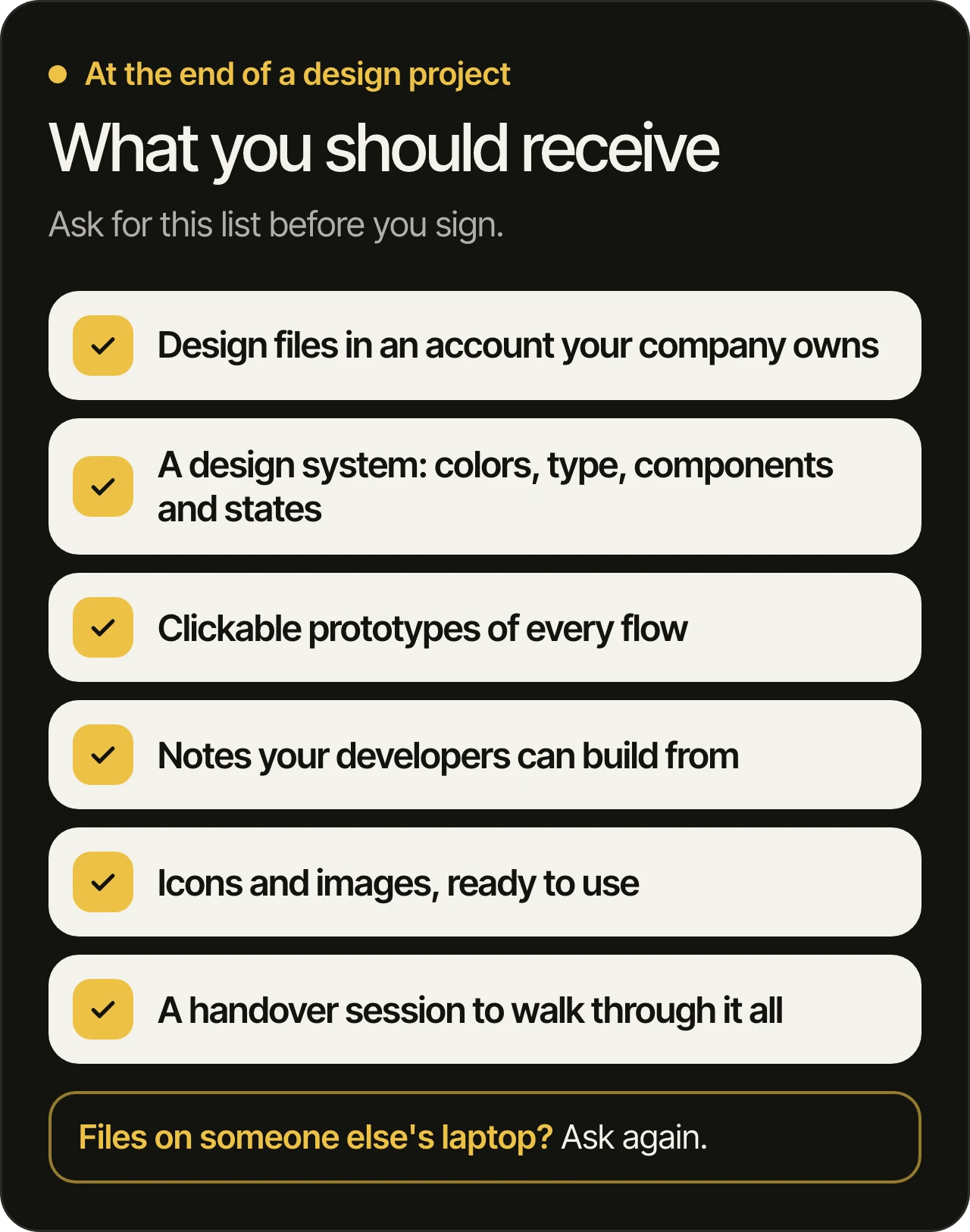
The same rule applies to the product itself. We keep code, accounts and store listings in your name, and we think every owner should ask the same of any team. Our post on taking over an app from another developer shows how much it matters when you want to change teams later.
Questions owners ask
Do we need research before a redesign?
Yes, at least a look at what you already have. Analytics, recordings, support messages and store reviews show where people stop. A redesign that skips this tends to move things around without fixing the step where people leave, so ask an agency what it would study first.
Can a redesign keep our current users happy?
It can, when it changes the flows that cause problems and leaves familiar parts alone. Ask the agency which screens it would touch first and why, and whether the changes can be tried by real users before they are built. Our post on why apps fail after launch explains how to decide what to fix first.
Should design and development be one team?
It helps, because the people who draw a screen and the people who build it can settle problems early. It is not required. If they are separate teams, insist on a design system, written notes and a check of the finished build against the design.
How do we test a design before it is built?
With a clickable prototype that people from your audience use while someone watches. Give them a real task, such as booking or paying, and do not explain the screens. Where they hesitate is where the design needs work, and it is far easier to learn that before any code is written.
What files should we receive?
The design files, in an account your company owns, with the design system, the clickable prototypes, notes for developers, the icons and images and a handover session. The list in the image above is a good one to put in the agreement.
Choosing a design team?
Book a free 45-minute consultation. We go through your product before the call. We have been building products since 2021, and products our team has built are used by more than a million people. Our office is in Dubai, and our team works remotely in Beirut. Read more on our UI/UX design page, and see our pages for Dubai and Beirut.