How often should you release app updates? A guide for owners
Weekly, monthly or every few months? How to choose a release rhythm for your app, what store review changes and what to ask your team.
· 9 min read
Your developer says the next update is three months away. Or a new version appears every few days and you cannot tell what changed. Either way you are left asking how often a live app should be updated, and whether your team’s rhythm is a good one. There is no single right number, but there is a clear way to choose, and a short list of questions that shows whether your team has thought about it.
In short
- Smaller releases are easier to check, to undo and to learn from. A big release carries many changes at once, so when something breaks nobody knows which change did it.
- Three things set your rhythm: how quickly your team can test and review a change, how the store’s review works, and how often your users want something new. A rhythm that ignores any of the three does not last.
- A build is not a release. A build you try on your own phone can be ready every week. What reaches your users, and when, is a separate decision.
- Let each release out in steps. Both stores can send an update to a share of your users first, and pause if something looks wrong.
Why one big release is the riskier choice
When releases are rare, work piles up. Each release then carries many changes, and each of them might break something. A crash after a big release sends the team looking through all of it. Meanwhile your users wait for the fix, and the next chance to ship one is a full cycle away.
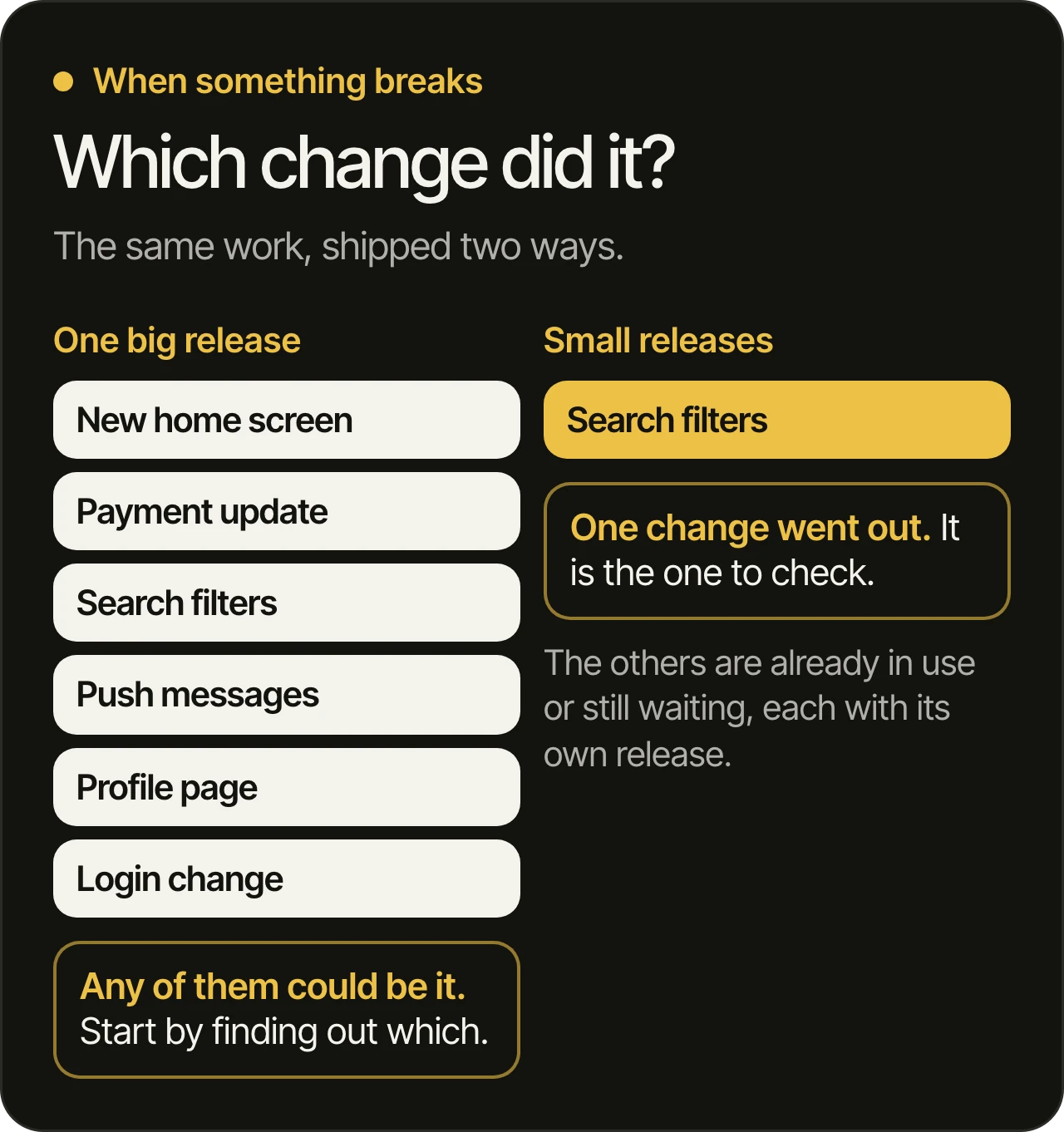
Rare releases also delay what you learn. A change that does not help your users stays out of sight until the next release, and by then more work has been built on top of it. We make the same point in why apps fail after launch: small changes, released often, show a wrong decision while it is still small.
Frequent is not always better. People who open an app once in a while can find constant updates tiring, and an update that changes little is not worth a notification. The aim is releases small enough to check and spaced to suit your users.
A build is not a release
Owners often hear “we have a new version” and picture it in the store. Three different things hide behind those words, and keeping them apart makes every conversation with your team clearer.
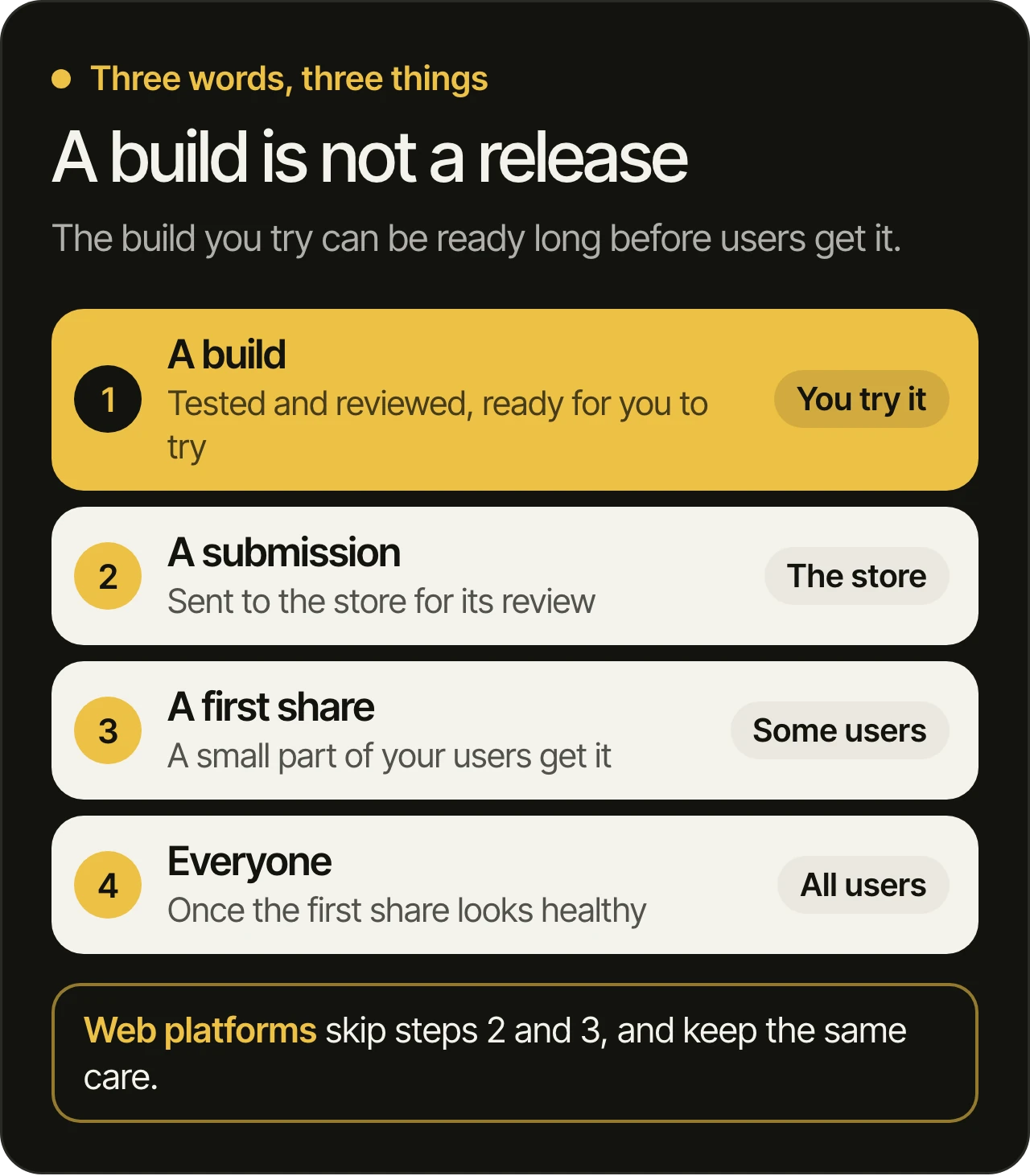
- A build is a version of the product that has been tested and reviewed, and that you can try on your own phone or in your browser. It can exist every week.
- A release is a version that goes to the store, passes the store’s review and becomes available to your users.
- A rollout is how many of your users get that release, and how fast.
A web platform has no store in the middle, so a change can reach users as soon as it is ready. The care is the same: a small change, tested, read by a person, and easy to switch back.
For your team, the useful question is which of the three they mean. “We release every month” and “we build every week” can both be true, and together they can be a healthy rhythm.
What the store changes
On mobile, the store’s review sits between your team and your users, and each store has its own rules.
Apple
Apple says App Review works around the clock, and its page gives the typical review times. It also says an incomplete submission can be delayed or fail. If you face extenuating circumstances, such as a critical bug, you can ask for an expedited review, and Apple asks you to include the steps to reproduce the bug. Details are on Apple’s App Review page (opens in a new tab).
Plan for the review as a step that has its own time, and never build a plan that needs it to be instant. A typical time is not a promise for your update, and an update that is ready on Friday is not live on Friday.
Google Play
Google Play also checks updates before they reach your users, and it lets you release an update through a staged rollout, which we come to next. Ask your team how long Google’s check takes for your app in practice, and plan the same way.
The same habits help on both
A complete submission passes more smoothly. That means the store listing, the privacy answers and a demo sign-in, if your app has a login, are ready before the build is sent, as we describe in what goes into the first version of an app.
Let each release out in steps
Both stores can send an update to a share of your users first. If a problem shows up, only that share meets it.
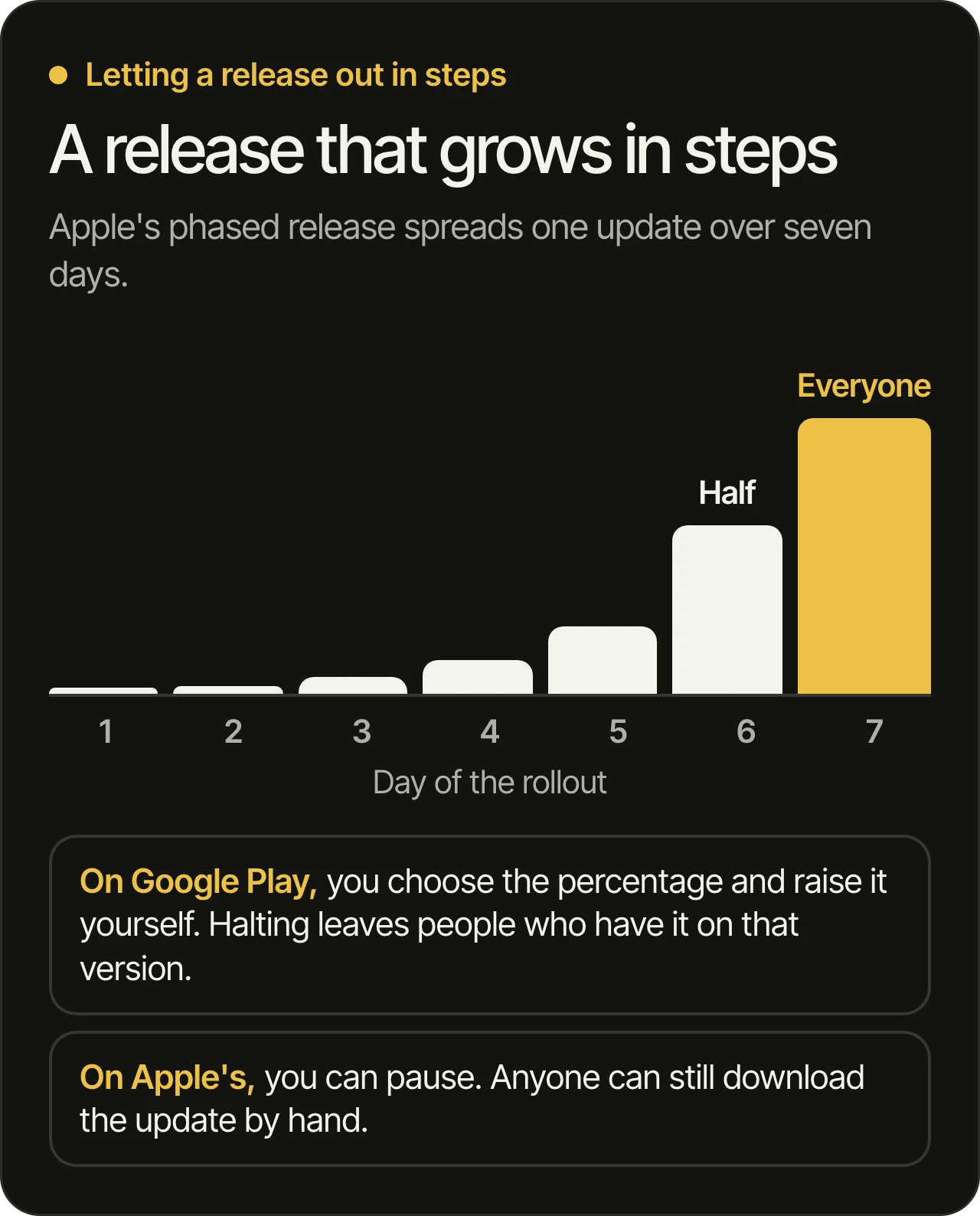
- Apple calls it phased release. Apple’s help says the update goes out gradually over seven days, to a random sample of users with automatic updates on eligible devices. You can pause it, for up to 30 days in total, and release to everyone early if you choose. The page also says anyone can download the update by hand at any time, so phased release only limits automatic updates. Read it on Apple’s release in phases page (opens in a new tab).
- Google calls it a staged rollout. You choose the percentage, and Google’s help says it will not increase automatically, so someone has to raise it. You can halt it, and users who already received the version stay on it. Google also says staged rollouts work for updates only, not for the first publication of an app, and recommends releasing a fixed version if you find a problem. See Google’s staged rollout help (opens in a new tab).
Halting a rollout stops it from spreading. On Google Play, people who already have the version stay on it, so plan on the fix being a new version. That is one more reason small releases matter: a small release has a small fix.
During a rollout, watch the numbers that show a problem early. The stores’ crash reports are the first place to look, and how to read app crash reports explains them for non-developers. The reviews and support emails come next, and how to analyze app store reviews shows how to sort them.
Which rhythm fits your product
Start from your situation.
- A live product with known problems. Release small and often. Each fix reaches people while it still matters, and each one is easy to check on its own.
- A product used often, such as a booking, delivery or messaging app. Regular small releases suit it. People expect it to keep working and to keep improving.
- An app people open now and then. Keep building often, but gather changes into a release when they add up to something worth telling people. A steady monthly or quarterly release can suit it, with room for an urgent fix any time.
- A large feature. Build it in small pieces and keep it switched off for users until all of it works together. The pieces are tested and reviewed one at a time, and the launch becomes a decision you make rather than a deadline the code forces.
- A product nobody has touched for a long time. Begin with a written audit, then the fixes that cost you customers, and let the rhythm come after. We describe the order in taking over an app from another developer.
What to ask your team
Each question has a plain answer, and the answer shows whether anyone has thought about the rhythm.
- How often do we release to users, and what decides it? You should hear about the store review, the testing and your users, not a habit.
- What is in the next release, and who asked for it? Every item should trace to something the business needs.
- How much goes into each release? A list of many unrelated changes is a warning sign.
- Do we release in steps? On both stores the answer can be yes, so ask who watches the first share.
- What happens if a release goes wrong? Expect a plan to pause the rollout and ship a fixed version, with named people who do it.
- How will we know it helped? Agree what to look at (crashes, reviews, the step in your signup or checkout) before the release goes out, so the result can be read afterwards.
- Can we try the next build ourselves? If the only way to see a change is after it reaches your users, you are testing on your customers.
How we work
At MobiStack Digital, you get a new build to try every week, on your own phone or in your browser. On a takeover, the weekly builds start once the code and accounts are in your name. The build is for you to try. What goes to the stores, and when, is a decision we make with you, based on the changes and on your users. Every change passes automated tests and automated code review, and one of our developers reads it before it ships. A change nobody read does not ship. Our process explains how the weeks run, and a takeover starts with a written audit.
Questions owners ask
Is a weekly update too often for an app?
Not if each one is small and worth having. What tires users is updates that change nothing they can see, or that break things. A weekly build for you to try does not mean a weekly release to the store. Your team can gather builds into releases that suit your users.
Do we need to release every build?
No. A build is a checkpoint you can try and judge. Release it when it is worth your users’ attention, and keep the rest in the next release. That is also a good moment to write release notes that say plainly what changed.
Can a release be undone if it has a bug?
Plan on fixing forward. Google says users who received the version stay on it when you halt a rollout, and recommends releasing a fixed version. Apple lets you pause a phased release, and people can still download the update by hand. This is why a staged release and a small change matter: fewer people meet the bug, and the fix is easy to find.
How long does the store take to approve an update?
Apple publishes the typical review times on its App Review page (opens in a new tab), and says an incomplete submission can be delayed. Treat those times as how review typically runs, not a promise for your update, and send complete submissions. Ask your team to plan with room for the review.
Does a website or web platform need the same rhythm?
A web platform has no store review, so a change can go live as soon as it is ready. The same rule holds: small changes are easier to check and to switch back. Ask your team how a change reaches your users, who reads it first and how it is switched back if something goes wrong.
What to do next
A good release rhythm comes from your product and your users, and it shows in what your team can tell you about it. Ask the questions above in your next meeting, and note which ones get a clear answer. If you would like a second opinion, we go through your product before the free 45-minute consultation and show you what we would look at first.